You know the scene already. A volunteer texts that the walk list doesn’t match the precinct packet, a field captain is holding three printed spreadsheets, and the data entry person is still catching up on yesterday’s doors. By the time the team meets to compare notes, half the conversations are sitting in clipboards, a few are in a phone app, and the rest live in someone’s memory.
That’s where constituent management software earns its keep for campaigns. It gives field teams one place to capture who was contacted, what happened at the door, and what should happen next, without turning every shift into a cleanup project. For canvassing teams, that means less guessing, faster turf prep, cleaner follow-up, and better visibility for the people running the operation.
Campaign work doesn’t fail only when the message is weak. It also fails when the field team can’t move information from the street to headquarters quickly enough to act on it. Older campaign computerization already showed how fast contact systems can become core infrastructure, by 1986 an estimated 75% of campaigns nationwide were using computer technology, up from 20% in 1984, and by 1988 presidential campaigns were using computers for delegate tracking, fundraising, thank-you letters, press releases, electronic news archives, and communication between field offices and headquarters (The New York Times).
Practical rule: if your team can’t trust the walk list, the software isn’t just inconvenient, it’s slowing the entire field operation.
Introduction Why Canvassing Teams Outgrow Spreadsheets
A spreadsheet works until the first real campaign week hits. Then the list gets copied, renamed, emailed, printed, marked up, and copied again, and every version starts drifting away from the truth. Someone writes notes in the margin, someone else updates the master file at night, and the field lead spends the next morning trying to reconcile six small versions of the same universe.
That’s the moment a campaign outgrows simple tools and needs a system built for field movement. Constituent management software keeps the voter or constituent record tied to the interaction itself, so a door knock, a phone call, a volunteer note, and a follow-up task all live in one workflow instead of scattered across separate documents. For managers, that changes the job from hunting information to directing it.
What gets easier once the data stops fragmenting
The first win is operational. Teams can cut turf faster, route canvassers more cleanly, and capture results even when the field is offline or working in weak signal areas. The second win is supervision, because a field director can see what’s happening without waiting for end-of-day spreadsheets.
That shift matters in campaigns of every size. A city council race may need a lean operation that can’t afford admin drag, while a congressional campaign may need multiple teams reporting into one shared structure. Either way, the system has to support the people doing the doors, not force them into extra admin work after the doors.
You’ll leave with a practical way to think about the category, a clear sense of how it differs from a generic CRM, and a framework for choosing tools that fit real canvassing work. You’ll also be able to tell where a platform helps, where it creates hidden friction, and what a privacy-safe rollout should look like before your next field shift.
What Constituent Management Software Means for Campaigns
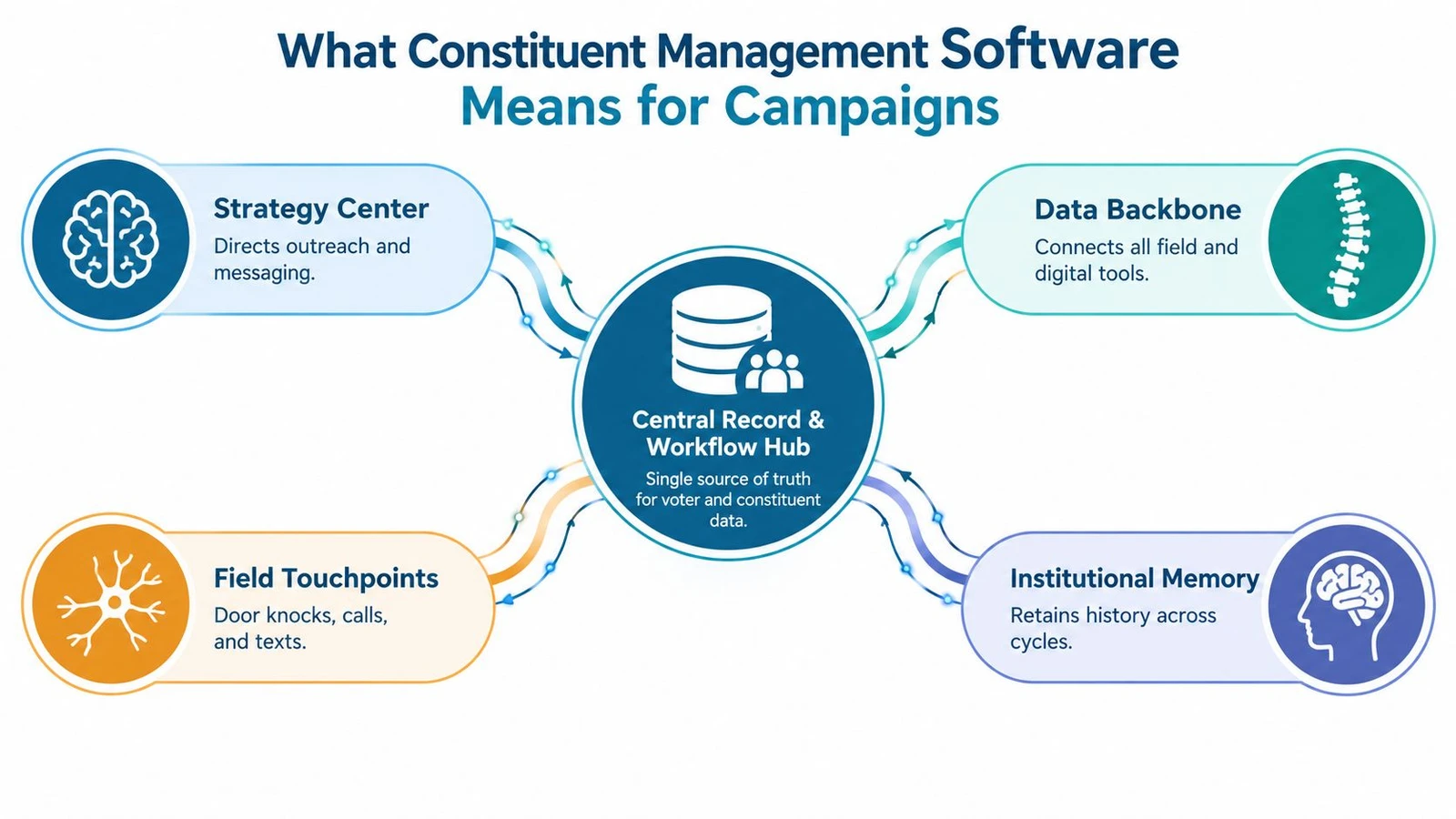
A field team can collect hundreds of interactions, then lose the thread if each note lives in a different place. Constituent management software prevents that scatter. It acts like the campaign’s central switchboard, keeping the contact record, location, notes, tags, route, and follow-up together so the next action is clear.
At the basic level, the software stores contacts and interactions. In a campaign, it does more than a database because it ties people, places, and tasks into one working record. Early campaign systems handled logistics such as delegate tracking and communication between field offices and headquarters, the same kind of coordination modern tools now handle inside everyday field work.
The plain-language definition
Constituent management software is the system that captures every campaign contact, connects it to the right person and place, and routes the next action to the right team member.
That definition matters because campaigns use “constituent” broadly. It can mean voters, volunteers, donors, petition signers, event attendees, or community contacts who are not on the voter file. The point is not just storing names. It is preserving the relationship so the campaign knows what the person heard, how they responded, and what should happen next.
Why this is different from a generic CRM
A generic CRM usually starts with sales pipelines, deals, and customer journeys. Campaign work starts with turf, field notes, issue tags, canvass scripts, and geography on the ground. The relationship map is built around mobilization, persuasion, and turnout.
That difference shows up in the data model. Campaign systems need to handle overlapping roles, such as a person who is both a volunteer and a donor, or a voter who attended a town hall and asked for a callback. They also need to keep institutional memory across cycles, so teams do not rebuild the same relationships from scratch every season.
The public-sector version of this category shows how far it can go. New York Senate’s Bluebird CRM supports a very large constituent base and handles communications at scale, which points to the kind of operational load a well-run platform can carry.
Core Features That Power Effective Field Operations
The most useful way to judge constituent management software is not by a feature checklist, but by how it handles a shift. If the tool helps a canvasser get from assignment to logged result with fewer handoffs, it’s doing real work. If it only stores records after the fact, the field team will still be stuck stitching things together manually.
The foundation is one accurate record
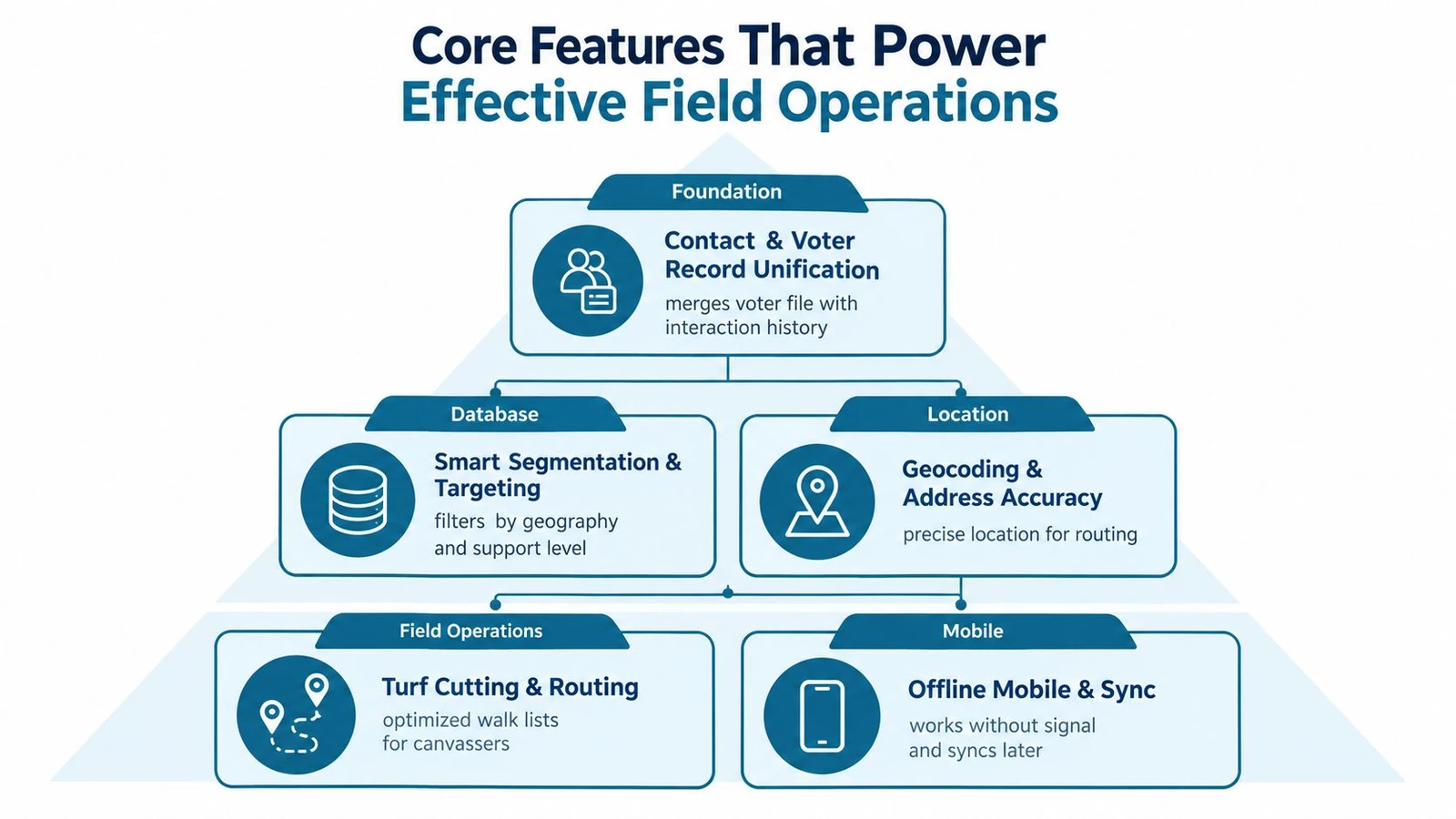
Everything starts with contact and voter record unification. The system needs to merge voter file data with interaction history so a canvasser isn’t guessing whether a person has already been contacted, tagged, or assigned to another team. That unified record is what lets the field team stop treating every list like a fresh start.
Routing, capture, and sync have to work together
The next layer is where field operations either become smooth or messy. Geocoding and address accuracy make sure the address lands in the right turf. Turf cutting and routing turn the map into walkable assignments that save time on the ground. Offline mobile capture matters because doors don’t always come with strong signal, and canvassers still need to log results, notes, and survey answers before they leave the block.
The J-PAL summary of field experiments shows why this matters operationally. Face-to-face canvassing raised turnout by about 8 percentage points, while each piece of mail raised turnout by roughly 0.5 percentage points (J-PAL handbook PDF). That gap doesn’t mean mail has no value, it means the systems that manage door contact, routing, and follow-up can affect the channel that tends to move the most people.
The field gains come from disciplined contact assignment, not from asking canvassers to improvise their own workflows.
Logging, targeting, and handoffs close the loop
Once the contact happens, the software has to log it cleanly. Interaction logging and survey capture let the campaign see support levels, issues, and follow-up needs without retyping the same notes later. Smart segmentation then turns those records into better next-day targeting, while dashboards show whether the team is hitting the doors it planned to hit.
Integration matters too. A good system should move data into other tools without turning the campaign into a CSV factory. Platforms like doornoc also connect field activity to list sourcing, live reporting, and API-driven workflows, which can help teams reduce manual handoffs when they already have a clean operational process in place.
This offline canvassing app guide is useful if you’re trying to match these features to day-to-day field needs.
How Constituent Management Software Compares to Other Tools
A lot of campaign confusion comes from treating every database tool like it does the same job. It doesn’t. A generic CRM, a voter file platform, and a canvassing app each solve part of the puzzle, but they leave different gaps.
Here’s the simplest way to sort them out.
| Capability | Constituent Management Software | Generic CRM | Voter File Platform |
|---|---|---|---|
| Central contact history | Yes, with field notes, tags, and follow-up | Sometimes, but built for sales-style records | Limited, usually focused on voter data |
| Field workflow support | Yes, especially for canvassing and routing | Weak unless heavily customized | Not usually the main purpose |
| Offline canvassing capture | Often yes | Rare | Rare |
| Data merging from field and digital channels | Yes | Possible, but not native to campaign work | Limited |
| Reporting on campaign activity | Yes, usually operational | Business-oriented reporting | Voter-file oriented reporting |
| Privacy and data governance needs | High, because multiple data sources get merged | Varies by setup | High, but usually narrower |
The biggest difference is purpose. Generic CRMs are built around customer relationships, while voter file platforms are built around data access and selection. Constituent management software sits in the middle, because it has to manage both the relationship and the workflow that moves information through the campaign.
That middle position is also where privacy concerns sharpen. Integrated campaign databases combine electoral-roll data with field notes and issue tags, which increases sensitivity because multiple sources are merged into one operational record (Bennett paper). In practice, that means the team needs to think about who can see what, how long the data is kept, and how records move between the field, email, events, and enrichment tools.
If you’re trying to understand the government-adjacent side of the market, this NGP VAN overview can help clarify how political data ecosystems differ from general-purpose CRMs.
Campaign Use Cases and Workflows That Deliver Results
A campaign system earns its keep in the field. The test is not a feature checklist, it is whether a volunteer can open the app at the door, whether a field manager can see progress by midday, and whether the team can decide on follow-up before the day ends.
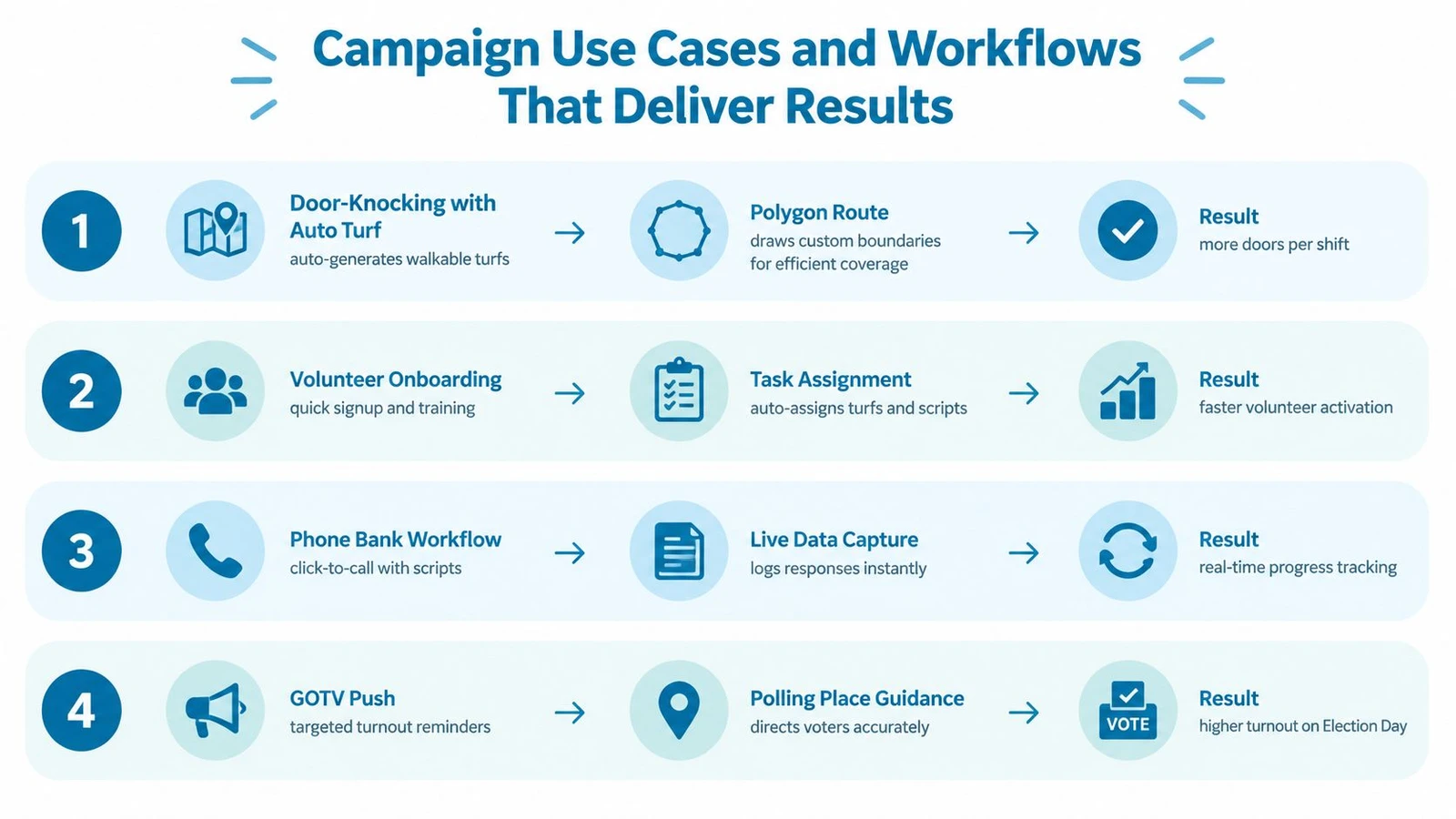
Door knocking from map to dashboard
A field captain cuts turf, assigns canvassers, and sends them out with a walking list. With offline mode and walking mode, the canvasser can keep moving even if the neighborhood has weak connectivity, then sync the results later. The important part is not only logging doors, it is giving the captain live visibility so the next shift can change while the campaign still has time to respond.
Volunteer onboarding without dragging staff into admin work
Volunteer-heavy campaigns need quick intake, clear assignment, and simple supervision. A useful system lets the organizer bring people in, place them on a turf, and monitor whether they have started work. New volunteers do not need a lecture on software architecture, they need a clear path from signup to useful activity.
List sourcing and non-voter outreach
A campaign often starts with one list and ends with several. One team may upload a file from another source, match it to known records, and geocode the addresses before a canvass leaves the office. Another team may use Constituent Intelligence for non-voter contact programs, which helps when the campaign wants to organize supporters, event attendees, or community contacts that are not part of the voter file.
Field rule: success shows up when the data is ready before the shift starts and still useful after the shift ends.
From local races to large districts
Small campaigns care about speed and clarity. Bigger campaigns care about coordination across teams, consistent reporting, and clean handoffs between field, digital, and research. Public-sector use shows that constituency systems can carry very large communication loads, with Bluebird supporting about 20 million residents and over 30 million communications a year, as noted earlier.
If you want a field-first platform example, doornoc combines offline canvassing, route planning, real-time tracking, and MailVotes-based list sourcing in one place. That matters when a team wants the field operation to stay tightly connected to list prep and reporting.
How to Evaluate Vendors and Implement Without Friction
The wrong buying question is, “What has the most features?” The better question is, “What will my team use on a rainy Tuesday when the canvass starts late?” That’s where vendor evaluation gets practical.
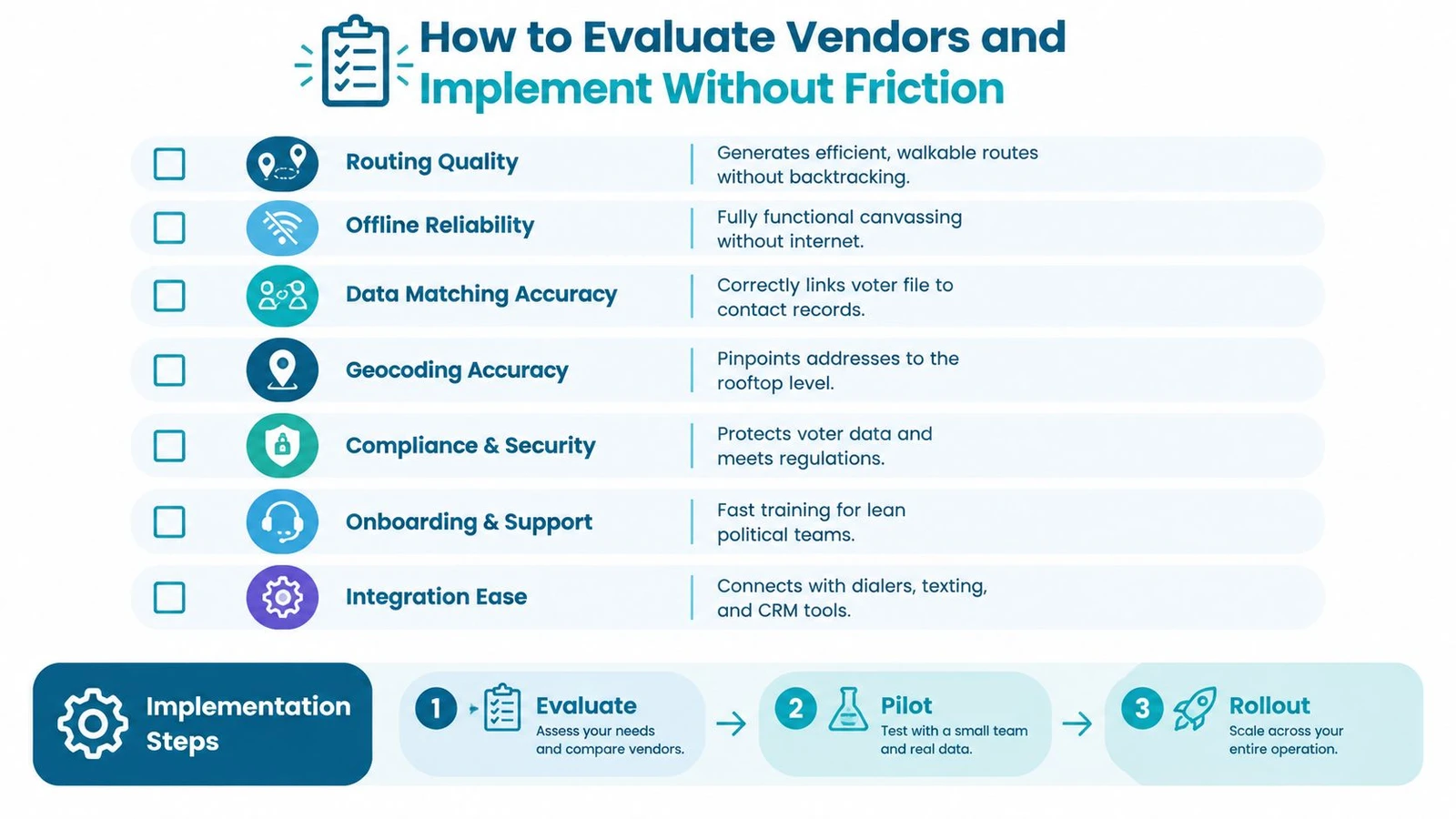
What to check before you sign
Start with routing quality. Ask whether the system can generate walkable routes without forcing volunteers to backtrack across streets that don’t make sense on foot. Then check offline reliability, because canvassing doesn’t wait for perfect connectivity.
Next, test matching and geocoding. If the platform can’t reliably link imported records to contact history or place addresses in the right location, your clean-up time will eat the field time you were trying to save. Also ask about privacy and data handling, especially consent management, retention rules, and rights requests, because unified records only help if the team can prove lawful processing and keep data flows controlled.
A few practical questions are worth asking every vendor:
- How does the system handle routing quality? Look for balanced, walkable assignments instead of generic map output.
- What happens when there’s no signal? The app should still capture data and sync later without loss.
- How accurate is matching and geocoding? Ask how the platform links imports to records and locations.
- How do integrations work? Prefer direct connections and APIs over repeated CSV exports.
- What support do lean teams get? Small teams often need onboarding help, not a long admin manual.
Roll out in stages, not all at once
A low-friction implementation usually starts with one pilot turf, one survey design, and one reporting cadence. That gives the team a chance to clean the data, teach the workflow, and catch problems before the whole field program is relying on it. If the pilot works, expand to more turfs, more volunteers, and more integrations.
Hidden costs usually appear when the campaign tries to stitch together membership, events, communications, and reporting after launch. That’s how shadow databases get created, one spreadsheet for volunteers, one for doors, one for issue notes, and one for leadership reports. The answer is to decide early which system owns the record and which tools only consume it.
If integrations are part of your stack, the Doornoc integrations page is a helpful reference point for understanding how field data can move through a broader campaign workflow.
Conclusion Building a Scalable Privacy Ready Canvassing System
The strongest field programs treat constituent management software as infrastructure, not just storage. It gives the campaign one place to keep contact history, one workflow for routing and follow-up, and one reporting rhythm that helps leaders make decisions while the race is still moving.
That only works if the system is built with privacy and workflow discipline from the start. Merging contact history, behavioral data, and third-party sources can create real value, but it also raises the bar for consent handling, retention, and clean synchronization across channels. The teams that win long term are usually the ones that keep their records useful without making their admin load explode.
If you’re evaluating your own setup, audit the current canvassing flow, run a small pilot, and measure whether the team can move from assignment to logged result without friction. Keep an eye on how easy it is to trust the data, because trust is what lets a field operation scale without slowing down.
Doornoc gives campaign teams a field-first way to plan routes, capture doors offline, sync data automatically, and source voter lists through MailVotes without turning the operation into a spreadsheet maze. If you’re building a canvassing system that needs cleaner routing, live visibility, and fewer manual handoffs, visit doornoc and see how it fits your workflow.
Running constituent services for an office? doornoc’s constituent intelligence keeps casework, contact history and voter-file data in one record instead of three systems.