A campaign office can start the morning with a voicemail about a housing problem, a direct message asking about polling access, a canvasser reporting a damaged sidewalk, and a spreadsheet full of follow-up promises from last night’s event. By midday, several staff members may have touched the same issue, yet nobody can say with confidence who owns it, what the constituent was told, or whether the field team needs to follow up in person.
Constituent services software gives those interactions a shared operating layer. It records requests, connects conversations, assigns work, preserves history, and helps office and field teams act from the same information. For campaigns and advocacy groups, the value goes beyond traditional 311 ticketing. The system can connect voter contact, casework, canvassing notes, and outreach data without forcing staff to reconstruct the story from separate inboxes and files.
Why Campaign Teams Need Constituent Services Software Now
A campaign manager may see a housing request in a spreadsheet, while a volunteer coordinator records the same household’s concern in a shared document. Meanwhile, the communications director answers a follow-up by email or social media. Each tool works alone. The gaps appear when one constituent uses several channels or a staff member departs without passing along the full context.
Scattered records make ownership difficult to verify, conceal duplicate requests, and weaken the handoff between office staff and field organizers. A canvasser may hear that a household needs help with a local service, while the caseworker cannot connect that conversation to an earlier phone call. One interaction then becomes several disconnected tasks, and the campaign loses the sequence of need, response, and follow-up.
Public-facing teams now manage sustained service demand rather than occasional correspondence. One 311 request-management platform reports use by 2,000+ government organizations, while another public-sector CRM source says enterprise implementations commonly take 12+ weeks and constituents often wait about 7 days on average for a response, as summarized by Parthenon’s Nexus overview. The practical lesson is straightforward: a platform can support a large operation, but the campaign still needs clear processes before adoption.
The field connection
Campaigns and advocacy groups often place “service” and “field” in separate workflows. That split hides useful context. A resident might raise an issue at the door, send an email afterward, and answer a text survey later. Linking those contacts shows what the person asked for, which staff member responded, and whether an in-person follow-up remains necessary.
Constituent services software acts as connective tissue between voter contact, casework, canvassing, and voter-data workflows. It can preserve the chain from the first intake to the next field action:
- Intake: Record the message, phone note, form submission, or canvassing observation.
- Classification: Tag the issue by topic, geography, urgency, program, or requested follow-up.
- Assignment: Direct the work to the appropriate staff member, department, or partner.
- Resolution: Log the response, referral, status, and next action.
- Field feedback: Share relevant updates with canvassers, organizers, or outreach coordinators.
Field rule: If staff must ask, “Where did this request come from?” the organization likely lacks a dependable shared record.
The platform therefore connects human contact with operational follow-through. The next sections examine how that record works, which capabilities affect resolution, how teams can compare and integrate platforms, and how to measure service quality and operational trust.
What Constituent Services Software Really Is and How It Works
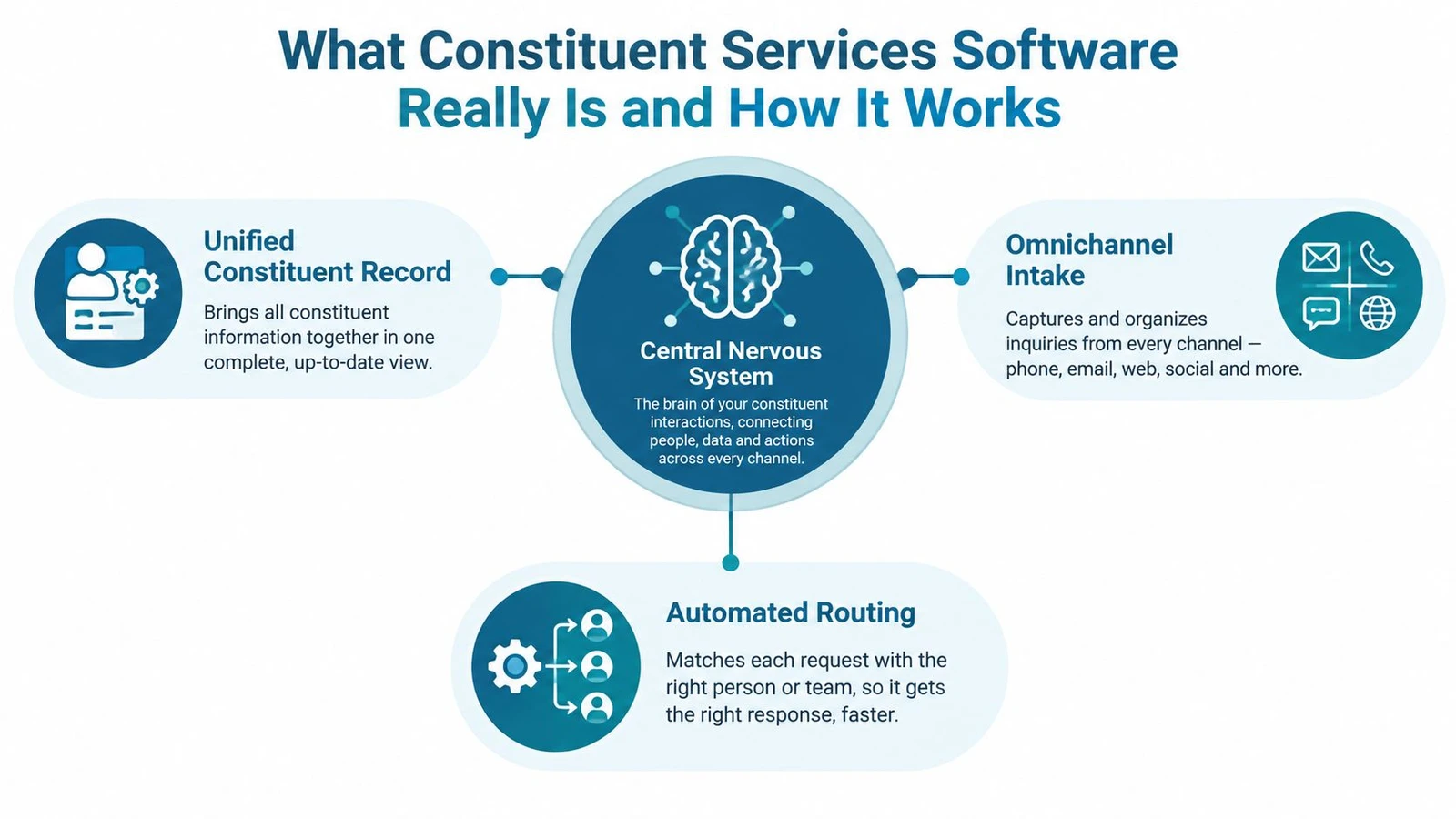
Think of the platform as a central nervous system for constituent interactions. Messages arrive through different senses, the system interprets them, routes them to the right team, and preserves the response so the next person doesn’t have to start from zero.
The analogy becomes useful when you translate it into system behavior. A constituent record isn’t just a contact card. It can combine communications, service requests, case history, contact preferences, and status information in one searchable place. That structure lets staff understand the relationship over time instead of treating every email or call as a fresh event.
From message to managed case
A practical workflow usually follows a sequence:
- Receive the interaction. The platform accepts information from email, phone notes, web forms, SMS, mobile submissions, or in-person conversations.
- Create structured data. Staff or automation assigns categories, location, priority, program, and relevant constituent details.
- Attach the event to a record. The new contact joins previous communications and open or closed cases.
- Route the work. Rules assign the case to a person, queue, department, geography, or external partner.
- Track the outcome. Staff document responses, referrals, pending information, and closure reasons.
- Report on the pattern. Managers review demand, backlog, response activity, and recurring issues.
That differs from a shared inbox. An inbox shows messages. A casework system should show the state of the work, who owns it, what happened before, and what must happen next. For a deeper comparison of this operating model, see casework software and constituent record design.
Why structured history matters
Structured data protects the handoff. If a volunteer records “needs help” without a topic, location, consent status, or next action, the next staff member still has to interpret the note. A consistent record makes those fields visible and searchable, which supports more reliable assignment and auditing.
Strong platforms also expose APIs, automation rules, and reporting dashboards. These tools let teams synchronize information with email, telephony, forms, or mobile intake while keeping a traceable event history, as described in the technical research on constituent service systems. The system’s value comes from connecting channels without losing context.
Core Features That Drive Faster Resolution
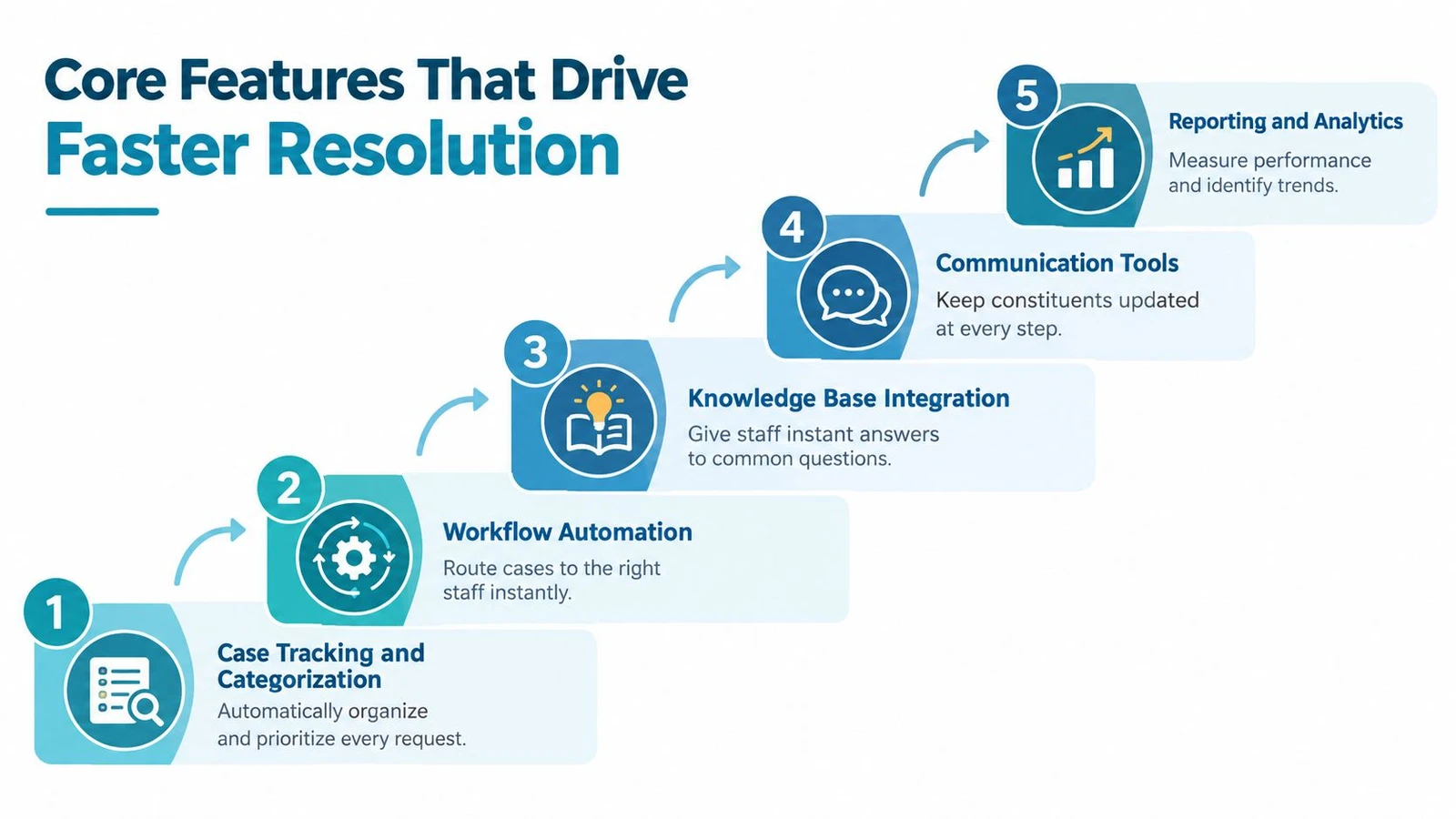
Resolution speed depends less on a long feature list than on how well the platform removes manual decisions from the workflow. Staff should be able to see what arrived, understand what it concerns, know who owns it, and communicate the next step without searching through unrelated tools.
Case tracking and categorization
Every request needs a clear identity. Case tracking gives the interaction a status, owner, category, and history. Categorization turns unstructured messages into operational groups such as transportation, housing, benefits, accessibility, event follow-up, or voter contact.
Good categories support action rather than merely describing the issue. A campaign might distinguish between a request for policy information, a constituent needing a service referral, and a canvassing follow-up that requires an organizer visit. The categories should be simple enough for volunteers to use consistently and specific enough to support reporting.
Workflow automation and SLA management
Automation handles predictable movement. A platform can assign cases based on issue type, geography, language preference, staff queue, or urgency. It can also create reminders when a response is pending or when a case approaches its service target.
An SLA, or service-level agreement, isn’t only an enterprise term. Campaigns can use internal response expectations for urgent constituent needs, volunteer follow-up, media inquiries, or partner referrals. The important question is whether the system makes the expectation visible and records exceptions instead of relying on memory.
Omnichannel intake and communication
Residents don’t use one doorway. They may send an email, reply to an SMS, complete a web form, call the office, or mention an issue during a door conversation. A platform that brings those channels into one record reduces duplicate entry and gives staff a fuller view of the interaction.
Independent coverage describes constituent CRM systems as databases that log and categorize contact across email and phone, while civic-software guidance highlights SMS, email, web, mobile submissions, GIS triage, and automated assignment as important operational capabilities in field-oriented workflows. The overview of civic software capabilities provides background for that model.
GIS routing and integration readiness
Location can determine responsibility. GIS-based routing can send a report to the correct district, field organizer, department, or partner without waiting for manual sorting. Offline-capable mobile workflows matter when canvassers or advocates work in areas with unreliable connectivity.
Integration readiness determines whether the platform becomes a useful hub or another isolated application. Look for documented APIs, stable identifiers, export controls, and a data model that can connect constituent records to voter-contact or advocacy workflows without duplicating people.
Dashboards and knowledge support
Dashboards help managers see unresolved work, recurring topics, overloaded queues, and geographic patterns. A knowledge base can give staff approved answers to common questions, but it shouldn’t replace judgment for sensitive or complex cases.
The strongest setup combines case visibility, communication tools, reporting, and human review. Automation should reduce sorting and repetition, while staff retain responsibility for decisions that affect constituents.
The following video offers a visual explanation of how digital service workflows can be organized:
How to Choose and Integrate the Right Platform
The right platform depends on the workflow you own. A local campaign may need fast mobile intake and voter-data synchronization. An advocacy organization may prioritize multi-program casework and partner coordination. A legislative office may need formal permissions, audit trails, multilingual communications, and long-term constituent history.
Don’t begin with the vendor demo. Begin with the handoff that currently fails. Trace one issue from first contact through assignment, field follow-up, response, referral, and closure. Then ask which system should create the record, which system should update it, and which team should be accountable.
A practical comparison matrix
| Evaluation Criteria | What to Look For | Why It Matters |
|---|---|---|
| Unified constituent record | Contact history, cases, preferences, consent, and notes connected to one person or household | Prevents staff from rebuilding context across tools |
| Intake channels | Email, forms, phone notes, SMS, mobile, and in-person entry | Captures how constituents actually reach the organization |
| Field integration | Canvassing workflows, offline capture, geospatial data, and structured surveys | Connects door conversations with office follow-up |
| Voter-data compatibility | Controlled matching, clear permissions, and support for voter-contact systems such as MailVotes | Reduces duplicate records and manual list handling |
| API and data model | Documented APIs, stable identifiers, webhooks, and usable exports | Supports custom workflows without creating another silo |
| Workflow controls | Routing rules, queues, statuses, reminders, and service targets | Makes ownership and next actions explicit |
| Non-311 case support | Multiple programs, referrals, partner access, and related cases | Handles human-services-style work rather than only simple tickets |
| Mobile and offline use | Reliable data capture without constant connectivity and later synchronization | Protects field data in difficult operating conditions |
| Adoption and support | Training, permissions, documentation, implementation help, and responsive support | Determines whether the configured system survives launch |
All-in-one suite or routing layer
An all-in-one suite can reduce the number of applications staff use, but it may impose a rigid data model or require more extensive configuration. A routing layer can fit existing tools more easily, yet it may leave case history, reporting, or permissions scattered across systems.
Market coverage still describes fragmentation, including siloed systems, limited training capacity, and long implementation timelines. Reviews of public-sector CRM software also distinguish between tools that centralize resident requests and systems that can manage broader business, social-service, or cross-department cases, as discussed in public-sector CRM selection guidance.
Ask vendors to demonstrate your real workflow. Give them a sample interaction that begins at the door, moves through a caseworker, requires a referral, and ends with a constituent update. If the demonstration only shows a clean form and a dashboard, you haven’t tested the difficult part.
For campaign field operations, doornoc can provide mobile canvassing, offline data collection, route planning, real-time monitoring, voter-data services through MailVotes, constituent intelligence tools, and API access. Treat those capabilities as integration criteria, not as a substitute for evaluating your complete casework model. Additional context on CRM requirements appears in citizen relationship management software.
Implementation Steps and Best Practices That Stick
Implementation works when the team agrees on the work before configuring screens. Start with a shared case definition, reliable data, and clear ownership at every handoff. The goal is a connected path from voter contact or online intake to casework and the voter-data workflow, so a door note can become an assigned case rather than a forgotten message.
1. Prepare the data
Inventory spreadsheets, inbox labels, phone logs, voter-contact files, partner lists, and existing case records. Remove duplicates, standardize names and contact fields, document consent, and decide what should migrate. Leave outdated notes behind unless they support current work.
2. Map the workflow
Write the route for common cases from intake to closure. Give statuses such as new, assigned, waiting for information, referred, resolved, and closed one clear meaning. Set escalation rules for urgent or sensitive cases, including who receives the alert and when.
3. Configure the system
After the workflow is agreed, create fields, roles, queues, categories, reminders, templates, and integrations. Keep the first setup narrow. Excess fields slow intake and encourage placeholder entries that weaken reporting and voter-data matching.
4. Train through real scenarios
Use the messages staff receive. A volunteer enters a door note, a coordinator assigns it, a caseworker updates the record, and a manager checks the history before sending a constituent update. Repeat the exercise until each person knows the next action and the correct handoff.
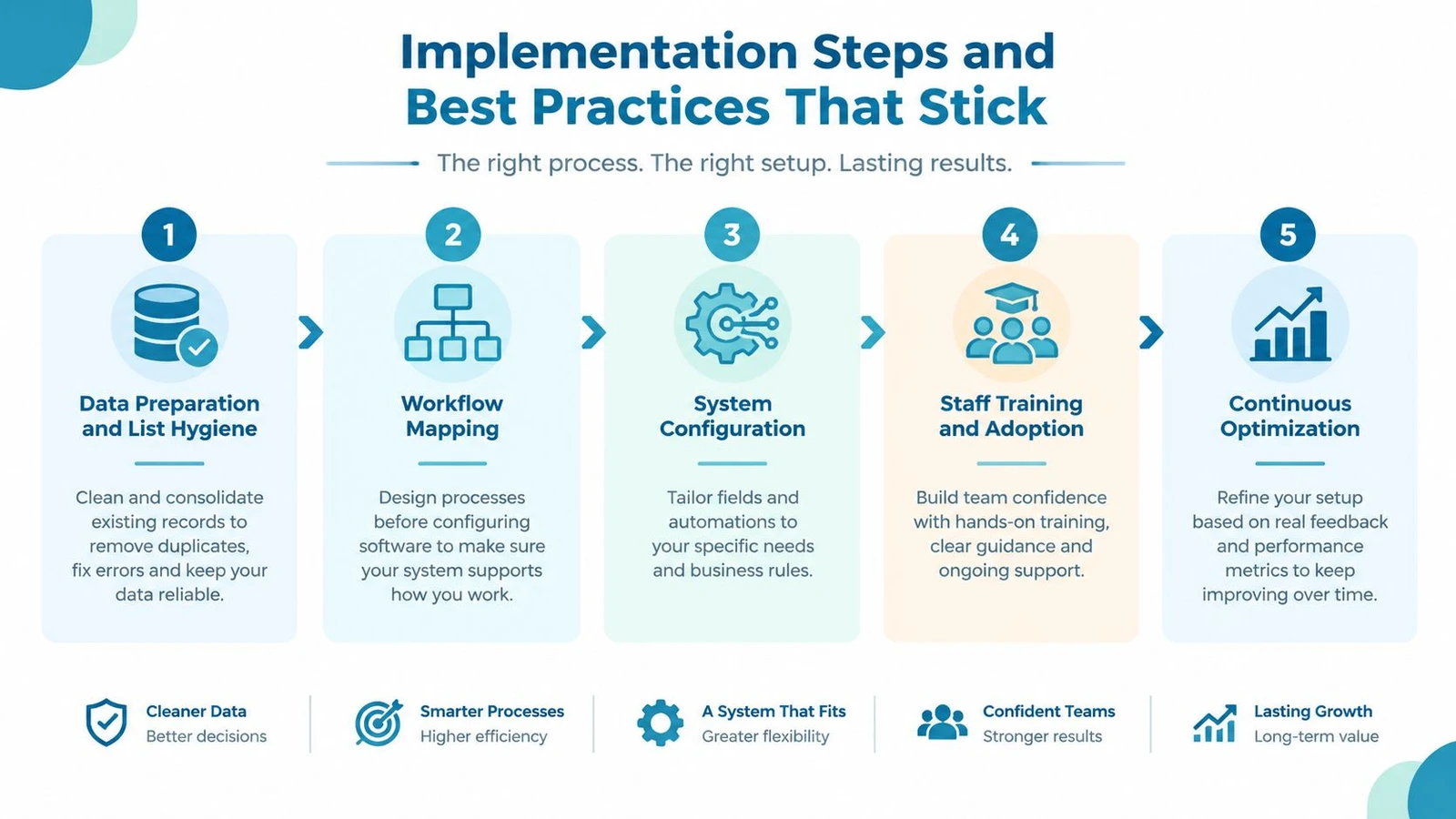
5. Pilot, launch, and improve
Begin with one defined team or workflow. Watch for duplicate records, unassigned cases, incomplete fields, missed reminders, and workarounds. Correct the process before adding more users or connecting more field channels.
Some enterprise public-sector implementations take 12+ weeks, according to the Parthenon Nexus market reference. Preparation supports that timeline, but speed should not mean skipping governance. Document decisions, assign a system owner, publish a short operating guide, and schedule regular reviews after launch.
Security Privacy and KPIs You Must Track
A constituent record can contain sensitive contact information, service details, political preferences, or notes from vulnerable people. Security and performance therefore belong in the same management conversation. A platform that responds quickly but exposes information damages trust, while a tightly controlled system that staff can’t use creates its own operational risk.
Massachusetts provides a clear example of how identity and service access increasingly connect. Its FY24 technology report says the Commonwealth’s single sign-on identity platform had over 1.5 million resident accounts and 500,000+ active monthly users. It also reports that more than 10 websites were upgraded with single sign-on and multi-factor authentication, Ask MA supported 20 languages for 16 services, and text reminders reached 13,000+ users, as documented in the Massachusetts FY24 IT projects report.
Governance controls
Set access by role, not convenience. A volunteer may need to submit an intake record, while a caseworker may need to view sensitive notes and a manager may need reporting access without editing every case. Use authentication safeguards, encryption, audit trails, retention rules, and documented consent practices appropriate to the information collected.
Multilingual access and proactive reminders also affect trust. They help organizations communicate in ways constituents can use, but teams should define who can send messages, what language preferences mean, and how opt-outs are recorded.
The dashboard should answer operational questions
Track metrics that lead to action:
- Average response time: How long does a constituent wait for an initial acknowledgment?
- Resolution time: How long do cases remain open?
- First-contact resolution: Which requests can staff resolve without another handoff?
- SLA compliance: Which queues miss internal response targets?
- Backlog: Where is unresolved work accumulating?
- Satisfaction: What do constituents report after the interaction?
Connect each metric to an owner and a review cadence. For practical field measurement, canvassing data metrics can help teams think about the relationship between contact records, follow-up, and accountability.
Real World Examples for Campaigns and Advocacy Groups
A local campaign receives a door note about repeated missed trash collection. The canvasser records the issue on a mobile form, the platform attaches it to the household record, and a staff member routes it to the appropriate local-service queue. When the office sends an update, the campaign can see the original field context instead of asking the resident to repeat the story.
An advocacy group runs programs for housing support, language access, and benefits navigation. One person may appear in several programs, but the organization still needs a controlled master record, separate case statuses, partner permissions, and an audit trail for referrals. A simple 311-style ticket may not be enough for that work.
A larger operation can connect office intake with field follow-up. Organizers see assigned outreach tasks, canvassers capture updates offline, and managers review progress through shared reporting. Voter-data tools and constituent-service records should remain governed by clear purpose, permission, and matching rules.
Before choosing a platform, confirm that you can:
- Define ownership: Every request has a responsible person or queue.
- Preserve context: Field notes, messages, and outcomes remain connected.
- Support exceptions: Complex cases can move across programs and partners.
- Protect information: Roles, consent, authentication, and auditing are designed before launch.
- Measure follow-through: Dashboards show response, resolution, backlog, and field activity.
doornoc combines mobile canvassing, offline data collection, route planning, real-time team visibility, voter-data services through MailVotes, and constituent intelligence workflows for campaigns and advocacy teams. Visit doornoc to see how its field and constituent data tools can connect door conversations with organized follow-up.
Running constituent services for an office? doornoc’s constituent intelligence keeps casework, contact history and voter-file data in one record instead of three systems.