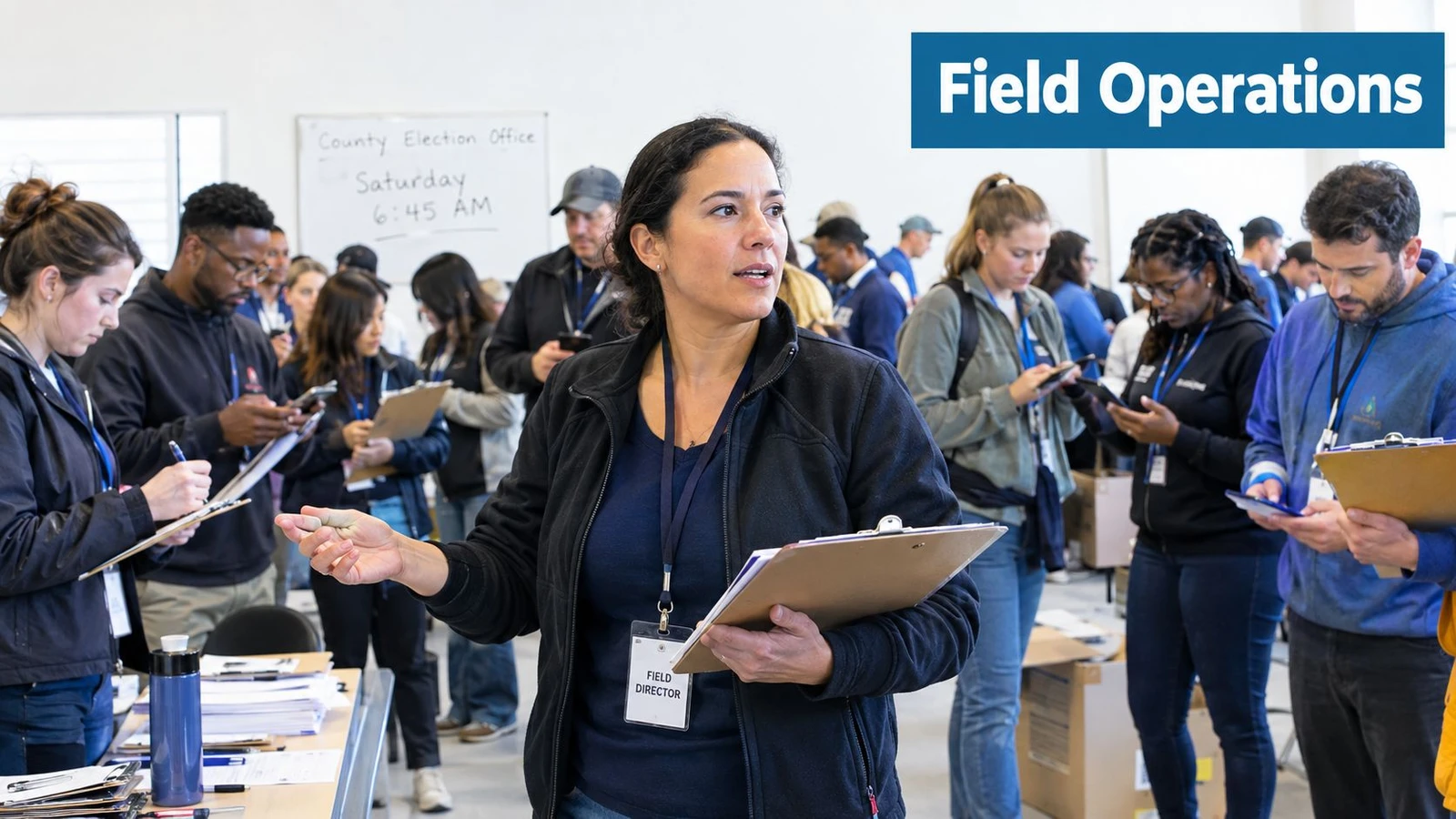
Saturday morning opens the same way in too many campaigns. Volunteers are waiting for walk sheets, one precinct still has a bad turnout file, a couple of canvassers are texting from a parking lot, and the field director is trying to decide whether the data in the spreadsheet is the data on the ground. Field ops software is the layer that turns that scramble into one operating picture, so turf, contact records, routing, and reporting all line up before the first door gets knocked.
The mistake is treating canvassing like service dispatch. Political field work is not one technician, one job, one invoice. It runs on walkability, same-day re-targeting, volunteer churn, and tight rules around voter files, so the software has to fit those constraints instead of pretending they do not exist.
| Capability area | What canvassing teams actually need | What fluff looks like |
|---|---|---|
| Turf building | Balanced walkable routes that reflect precinct boundaries and parity rules | A map export with no control over how doors are grouped |
| Offline capture | Notes, IDs, and survey answers saved when signal drops | A mobile form that fails the second a volunteer loses reception |
| Data sync | Clean merge-back into the voter file and reporting stack | CSV chaos and duplicate door statuses |
| Routing | Foot-first sequencing that respects walk speed and territory shape | Drive-time logic repackaged for walkers |
| Reporting | Counts that match what a field director can read out at the end of the day | Pretty dashboards that drift from the actual knock sheet |
A canvassing platform should sit between the voter file and the weekend walk. It should tell staff who is walking what, preserve the knock data when the phone goes dark, and feed the result back by sundown without a cleanup project. For a practical framing of that workflow, the door-to-door model on doornoc’s canvassing guide gives a good sense of how the operational layer should behave.
What Field Ops Software Means for Canvassing Teams
A field director usually feels the need for software before anyone uses the word “platform.” At 6:45 a.m., there are 90 volunteers spread across a county board of elections walk list, two versions of the turf file, and one staffer trying to reconcile clipboards, group chats, and a CSV pulled the night before. Field ops software exists to collapse that mess into a single operational view, not to add another dashboard to babysit.
The real job is coordination
The software has to answer practical questions fast. Who has which turf, which doors were reached, who needs a replacement packet, and which areas need to be recycled before lunch? A service-call FSM package often assumes a technician, a work order, and a dispatcher who can wait until Monday, but canvassing needs a tighter loop because the campaign lives and dies by same-day adjustment.
The best way to judge a system is simple. If it can’t keep the walk list, the volunteer assignment, and the outcome data aligned by the end of the day, it’s not field ops software for canvassing, it’s a generic admin tool wearing a field label.
Practical rule: If a platform can’t handle a precinct shift without a spreadsheet detour, it will cost staff time every weekend.
The right mental model is this. The software is not the campaign. It’s the connective tissue that keeps the campaign from fragmenting when people, phones, and neighborhoods all change at once. That is why the rest of the evaluation should focus on how well it handles turf, routing, offline capture, permissions, and reporting, not on whether it looks polished in a demo.
The Core Capabilities That Define the Category
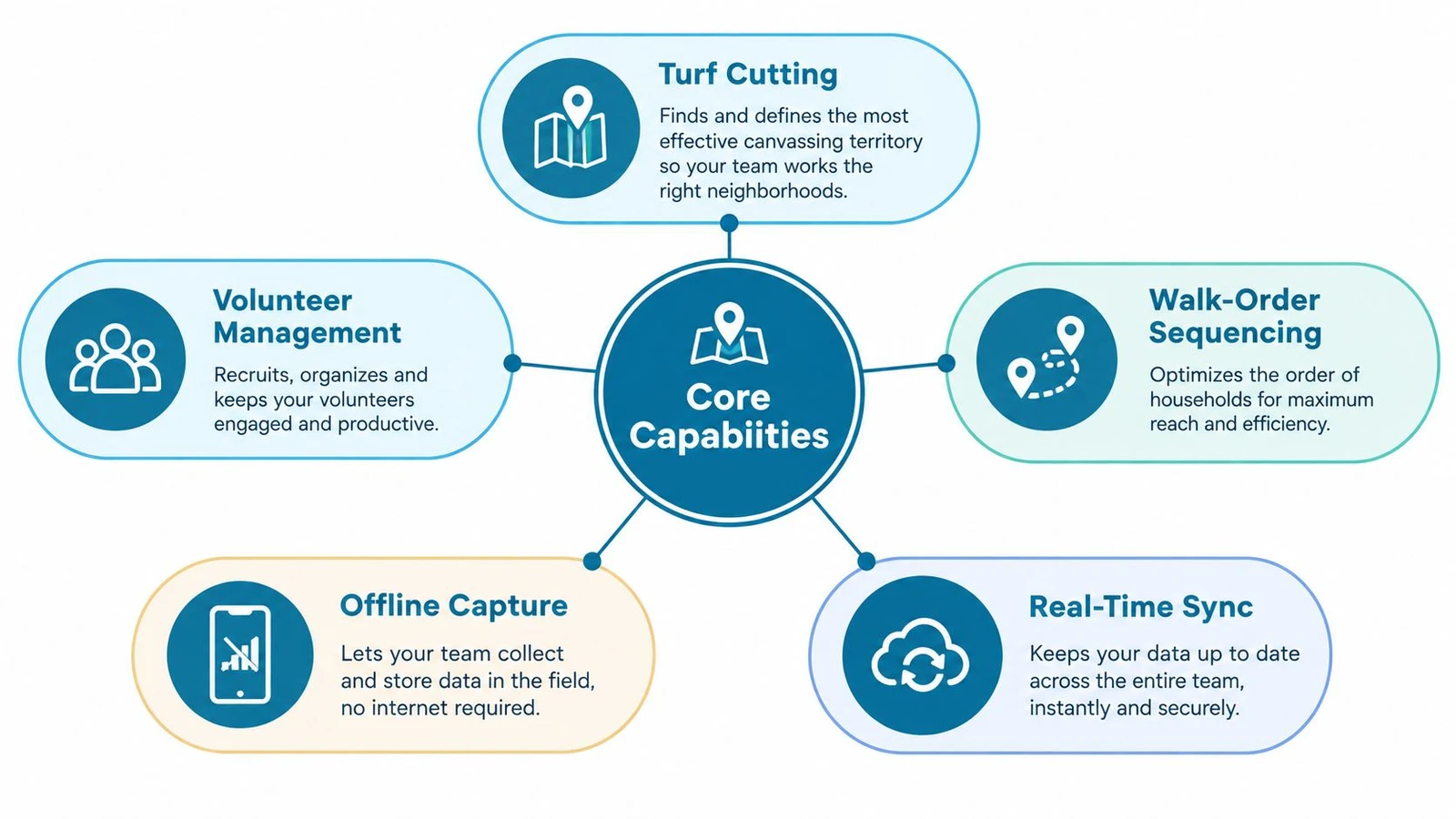
Canvassing-grade field ops software rises or falls on five pillars. Miss one, and staff end up rebuilding the workflow outside the system, which defeats the point.
The core job is coordination
Turf cutting with parity controls comes first. Campaigns need balanced routes that respect precinct boundaries and keep one volunteer from getting easier blocks than everyone else. Without parity, the walk turns uneven, and field leads lose a clean way to compare performance across teams.
Walk-list management tied to the voter file is next. A walk list that is not bound to permissions, suppression logic, and clear edit history becomes a data risk the moment volunteers start touching it. The file has to stay governable, not just accessible.
Offline mobile canvassing is a must. Teams need to keep recording conversations, IDs, and notes when signal drops, then sync later without losing edits or creating duplicate records, as detailed in the mobile canvassing technology guide for 2025 campaigns. The failure patterns campaigns should test include local queue loss, duplicate records, and unclear sync status.
Foot-first route sequencing matters more than drive optimization. A route that looks efficient in a car can be a bad walk on foot, especially in dense neighborhoods or terrain with barriers that make a short map distance feel much longer in practice.
Reporting that merges cleanly back into the campaign workflow closes the loop. Managers need counts that match what they will say on a Sunday finance call, not a pretty chart that falls apart the moment someone asks for door status by precinct.
What to stop calling differentiators
Some features are baseline now. Integrations to voter-management systems, campaign CRMs, and state voter databases are table stakes, not a reason to buy. The question is whether the platform treats those integrations as a live workflow or as a file transfer dressed up as software.
Bottom line: A canvassing platform earns its keep when turf, mobile capture, and reporting behave like one system, not three loosely attached features.
Campaigns that judge software by demo polish make the wrong call. The better test is whether the system protects turf, permissions, offline capture, and reporting without forcing staff into spreadsheet workarounds.
How Modern Platforms Stack Up Side by Side
The smartest way to compare platforms is by capability, not by brand worship. Campaigns do not need the same setup, and a clean matrix reveals where the category has converged and where the gaps still matter.
| Platform | Turf Cutting | Offline Capture | Foot Routing | Voter File Sync | Reporting | Pricing Model |
|---|---|---|---|---|---|---|
| Platform A | Strong turf tools, usually workable for balanced lists | Standard in serious products | Often basic or car-first | Usually supported | Good for daily totals | Often seat-based |
| Platform B | Stronger workflow controls and permissions | Standard | Better for mixed paid and volunteer teams | Usually deeper integration | Better export depth | Can be opaque |
| Platform C | Canvass-focused turf generation | Strong offline-first design | Better fit for walk lists | Usually built around file hygiene | Good field-level reporting | May scale by team size |
The important pattern is convergence. Serious systems now offer offline capture and voter-file sync, because no team can pretend those are extras anymore. The substantive differences show up in foot routing, same-day list recycling, and how fast a field director can change the plan when a precinct underperforms.
Where buyers still get surprised
Pricing opacity is the biggest trap. A platform can look affordable at first and then scale awkwardly as a race adds users, offices, or permission layers. Campaigns should ask how pricing changes when volunteer volume grows, because the wrong tiering model can turn a manageable budget into a moving target.
The other thing to watch is workflow fit. A tool can have every checkbox a buyer wants, but still feel wrong if it forces the campaign to bend its data process around the software instead of the other way around. That’s why the decision is less about raw feature count and more about how tightly the platform matches the actual voter-data workflow.
Routing and Offline Capture Under Real Field Conditions
Routing and offline capture fail in the places demos avoid. A suburban cul-de-sac with weak reception, a downtown high-rise with bad GPS drift, or a volunteer who opens the app, closes it, and reopens it after a dead zone, these are the moments that expose whether the system is built for canvassing or just marketed for it.
What happens when signal drops
The platform needs a local action queue, visible sync status, and conflict handling that doesn’t destroy the day’s work. If two canvassers hit the same door while offline, the system should reconcile the clash cleanly instead of forcing staff to sort it out by hand later. That is not a nice-to-have, it’s the difference between usable field data and a cleanup headache.
Partial-form saving matters just as much. Volunteers don’t fill out perfect records between knocks, and a form that loses notes after a refresh burns trust fast. A good system keeps the locally stored record until sync is confirmed, then shows the user exactly what made it back and what didn’t.
The routing question campaigns ask too late
Many teams think routing means the map looks tidy. It doesn’t. It means the route is walkable, the sequence matches the terrain, and the software doesn’t send a volunteer ten houses off because the geocoding is sloppy in dense neighborhoods. For route-building that understands those constraints, the guidance on automatic turf cutting and balanced canvassing routes is the right kind of benchmark.
If the software can’t survive a dead-zone street and a mid-shift reassign, it isn’t ready for a real weekend.
Field directors should ask three direct questions before the first shift. How long can the app sit offline without losing data, what happens when two people touch the same door record, and how quickly does a full day of offline activity merge back into the file? Those questions surface the actual risk, not the brochure version.
Comparing Platform Archetypes Through Voter Data Workflows
The most useful way to sort platforms is by how they treat the voter file. Some systems treat it as a static cut list. Some treat it as the center of the campaign. Others optimize for the knock itself and leave file hygiene as a separate discipline.
| Workflow Step | Vendor-Agnostic | Party-Integrated Suite | Canvasser-First App |
|---|---|---|---|
| Ingest and suppression matching | Imported file, usually handled as a batch process | Usually tied into a broader shared CRM | Often separate from the field workflow |
| Walk-list generation | Strong enough for cut lists | Usually more dynamic across channels | Optimized for volunteer-ready routes |
| Door outcomes | Captured in field, then merged back later | Shared across field, mail, and digital | Fast to record, with merge-back as a distinct step |
| Audit trail | Depends on the implementation | Usually stronger because the file is central | Can be narrower if hygiene sits elsewhere |
| Adding a new precinct | Easy if the file pipeline is simple | Easy if governance is already in place | Easy if the turf process is fast |
How the same record behaves
A static-file system is fine when the main job is getting a list into the field and back out again. It works best for teams that want low friction and can live with a separate file-cleaning process. The tradeoff is that data ownership and audit discipline can get blurry if several staffers touch the same workflow.
A party-integrated setup keeps the voter file alive across channels. Field, mail, and digital teams can work from the same segmentation logic, which helps when the campaign needs a coordinated message across touchpoints. The cost is more structure, more permissions, and more discipline around how records move.
A canvasser-first app gives volunteers a smoother knock experience. That can be a huge win on a heavy weekend, but only if the file-handling layer behind it is strong enough to prevent duplicate records, lost edits, and ugly merge problems later. The right choice depends on whether the campaign’s pain is data governance, field speed, or cross-channel coordination.
Matching Platforms to Campaign Size and Volunteer Model
Campaign size changes the software requirement fast. A school board race does not need the same operating system as a congressional field program, and pretending otherwise is how small teams overbuy and big teams underbuild.
Small teams need frictionless setup
School board and municipal races with 10 to 40 volunteers need a low-friction volunteer portal, simple walk lists, and a way to get people knocking without a week of training. The software should feel light, because most of these campaigns do not have a dedicated data team. They need something that gets the first turf out the door quickly and doesn’t punish a volunteer who only canvasses once or twice.
Mid-sized races need better control
State legislative and down-ballot statewide races with 50 to 200 volunteers need stronger reporting, cleaner permissions, and flexibility in how teams are managed. A paid staffer may be coordinating several volunteer shifts at once, so the platform has to support more structure without becoming bureaucratic. This is also where vendor flexibility starts to matter, because the campaign’s data habits are usually more mature than the race before it.
Large campaigns need governance and scale
Federal and coordinated campaigns with 200+ volunteers need role-based permissions, multi-office support, and API access for the data team. The question is no longer whether the app can collect door results, but whether it can do so without breaking governance, slowing onboarding, or forcing workarounds across offices. For a platform in that class, doornoc is one option because it combines mobile canvassing, route planning, offline collection, reporting, and integration hooks in one system.
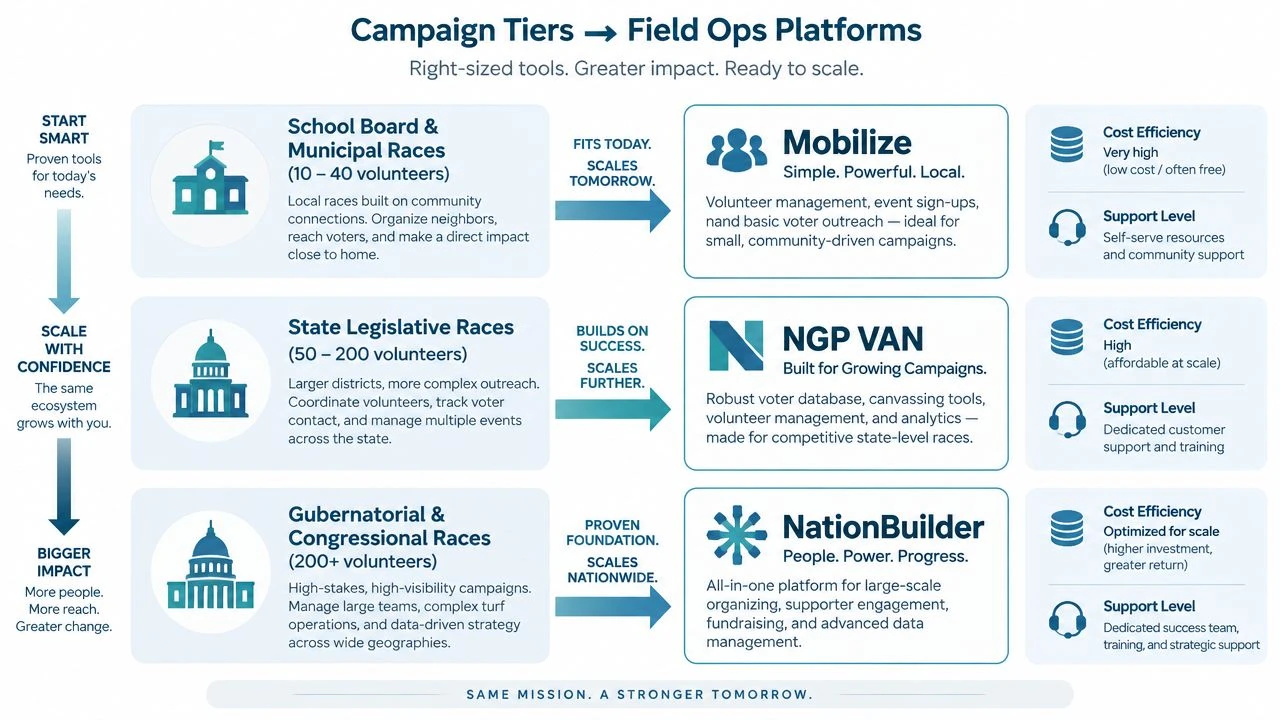
Buying rule is simple. Small campaigns should favor speed and clarity. Mid-sized campaigns should favor control. Large campaigns should favor governance and integration depth, because that is where the operational failures get expensive.
A Practical Evaluation Checklist Before You Sign
A vendor pitch is not the test. A one-week pilot on real turf is the test, and the campaign manager should treat it like a field exercise, not a sales demo.
Five checks that expose the weak spots
-
Pilot one real turf.
Use a live walk list with the actual precinct shape, not a sanitized sample. If the turf generation is clunky there, it will only get worse under pressure. -
Test offline capture on a dead-zone street.
Send a volunteer into a known bad-signal area and make them save notes, IDs, and a survey response. The app should keep working, show sync status clearly, and recover cleanly when the phone reconnects. -
Compare parity between walk data and exports.
The counts on the field side should match what comes out of the report. If the numbers drift, the campaign will spend the rest of the cycle reconciling instead of organizing. -
Read the data-handling terms in writing.
The vendor should spell out how voter data is stored, accessed, and synced. If the terms are vague, the campaign is taking unnecessary risk. -
Pressure-test same-day retargeting.
Recycle a list based on what was knocked, then see how fast the platform rebuilds the next wave. If that takes manual cleanup, the weekend workflow is too slow.
Decision rule: Walk away if the pilot needs repeated vendor intervention to handle ordinary field conditions. A system that only works with hand-holding will not survive a real campaign calendar.
The goal is not to buy the fanciest demo. It’s to buy the system that stays calm when the field gets messy.
Common Questions Campaigns Ask After a Pilot
Pair canvassing is the first awkward question. The software should let teams record joint work without blurring who knocked which doors, because field directors still need clean attribution and clean counts. If pair work can’t be separated in reporting, the campaign will struggle to compare shifts fairly.
Volunteer personal devices are the next concern. The main issue is not whether people bring their own phones, it’s whether the platform keeps data governed on those devices and syncs it back without creating exposure. A strong offline workflow with permissions and automatic sync reduces the risk of volunteers holding sensitive files in ad hoc ways.
Jurisdictional boundaries create another problem. When a turf crosses into another precinct or district, the system should preserve the boundary logic so the campaign doesn’t accidentally mix reporting or suppression rules. That is where turf controls matter more than fancy maps.
Reconciling canvasser-submitted IDs against the official voter file is a file hygiene issue, not a UI issue. The platform should make the merge-back process clear, keep edits auditable, and avoid overwriting clean records with a bad field entry. If the system can’t show where the record changed, staff will spend too much time tracing mistakes later.
Export format questions usually surface after a weekend when another office wants the data. The answer should be boring, which is good. A campaign-ready platform should export cleanly into formats a county party or state data shop can accept, without custom rework every time.
If a field team wants software that handles turf, walk lists, mobile capture, and reporting without turning the weekend into a cleanup project, doornoc is built for that kind of canvassing workflow. It combines route planning, offline data collection, live team visibility, and voter-data handling in one operating layer, which is exactly what a field director needs when the doors are live and the data has to land the same day.
Looking for a tool to run this? doornoc’s canvassing software bundles voter data, automatic turf cutting, the mobile app, and live reporting in one platform.