You’re in the war room, the walk list is half in Excel, the volunteer sign-up form lives in a separate spreadsheet, and the best field notes are still on paper or in a phone photo that nobody will remember to upload. By noon, the candidate wants a turnout readout, the communications lead wants the latest supporter list, and the volunteer captain needs a clean turf assignment before people start texting that they’re lost.
That’s where a constituent management system earns its keep. Not as a shiny software label, but as the place where field, voter contact, follow-up, and reporting stop fighting each other.
Why Spreadsheets No Longer Cut It for Campaigns
A campaign can survive messy files for a while. It can’t survive missed follow-up, duplicated outreach, and a field team that’s working from three different versions of the same universe.
I’ve seen the pattern over and over. A deputy campaign manager exports a list from the voter file, a field organizer adds door notes in a separate sheet, and the volunteer coordinator keeps a private tracker of who showed up last weekend. By the time the candidate asks what changed in a neighborhood, nobody can answer cleanly because the data never lived in one operational record.
A constituent management system fixes that by turning all of those fragments into a shared working environment. Contact records, interaction history, tasks, assignments, and messages sit together, so the team can stop retyping the same information and start making decisions from the same facts. That’s the operational difference between “we have data” and “we can use it today.”
Practical rule: if a field note can’t become a follow-up task without manual copying, the system is already slowing you down.
Campaigns also run on context. When a volunteer knocks on a door, the next person who contacts that voter should know what happened there already. A centralized system preserves that context across canvassing, phone, text, and email, which cuts down on duplicate outreach and keeps the conversation moving forward.
That matters most when the race gets fast. The campaign that can see the field picture in one place makes fewer blind moves, wastes less volunteer time, and responds quicker when the message on the ground changes.
CMS vs CRM vs Voter Files Explained
The terms get mixed together constantly, mostly because vendors love the overlap. But campaign operations don’t care about terminology games, they care about whether the tool helps a team knock doors, track responses, and follow up without dropping the ball.
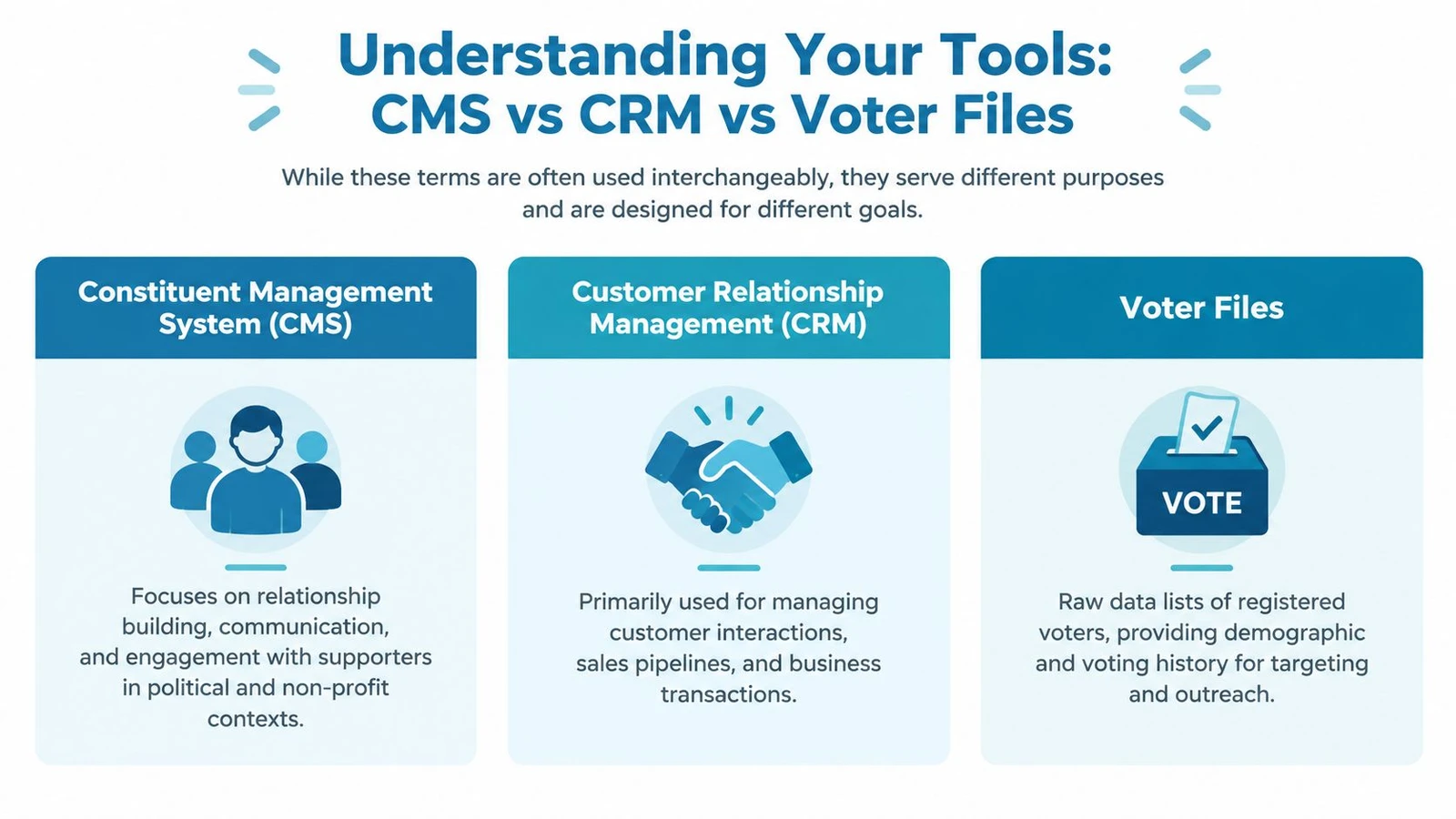
Consider a mechanic’s garage. A voter file is the parts inventory, a CRM is the general tool chest, and a constituent management system is the diagnostic computer plus the specialized tools built for campaign work.
What each one does
A voter file is raw targeting data. It tells you who is in the universe, and often enough to start segmentation, but it doesn’t manage relationships by itself. The campaign still has to decide what happened at the door, who followed up, and what message goes out next.
A general-purpose CRM is broader. It’s built to manage relationships, tasks, and communications, but it’s usually designed for business pipelines, not campaign field ops. That distinction matters, because campaigns need tools that handle canvassing, volunteer shifts, and rapid changes in turf, not just customer notes.
A dedicated constituent management system sits closer to the campaign workflow. Public-sector CRM is described as a strategy that combines people, processes, and technology to improve service delivery, reduce wait times, and increase satisfaction, and congressional systems have been moving in that direction for a long time. The Senate introduced automated correspondence systems in 1978, then authorized computer tapes of correspondence files in 1982, which shows how early government offices started shifting from paper-heavy workflows to structured digital records in the archived congressional CMS report.
A quick side-by-side view
| Tool | Primary job | Best user | Weak spot |
|---|---|---|---|
| Voter file | Targeting and universe building | Data team | Doesn’t manage workflow |
| CRM | Relationship tracking | Operations or fundraising team | Usually too generic for field work |
| Constituent management system | Campaign coordination and follow-through | Field, field operations, and communications | Needs clean setup to work well |
What matters isn’t which one sounds more impressive. It’s which one can hold contact history, assignment logic, and follow-up in one place without making volunteers hate the system. For a fuller campaign-specific look at the relationship layer, see this constituent relationship management guide.
Core Features of a Modern Constituent Management System
A campaign-ready system has to do more than store names. It has to help staff move from list to contact to follow-up without losing speed or context.
The core idea is simple. A good constituent management system becomes the operating record for every touchpoint, from a door knock to a phone bank note to a text reply. That is what lets a field director assign work once and trust the history to travel with the record.
The features that actually matter
Database and profile management comes first. You need household details, contact info, supporter status, notes, and interaction history in one record, because campaign staff cannot work off scattered lists and memory.
Communication tools matter next. Email, SMS, and direct mail only help when they draw from the same profile data and respect what happened before. The goal is not more volume, it is the right message to the right person at the right time.
When the database is the same place where outreach gets assigned, the team wastes less motion and makes cleaner decisions.
Engagement tracking keeps the record honest. Donations, event attendance, volunteer shifts, sign-ups, and service requests should all feed back into the profile, because a supporter who helped last month should not be treated like a cold lead this week.
Reporting and analytics have to be usable by field staff, not buried in a dashboard nobody opens. A campaign manager should be able to see what routes were completed, where responses are coming from, and where follow-up needs attention without waiting for a data export.
The feature that separates field-ready systems from office software is offline-first mobile capture. Canvassing rarely happens in perfect service zones, and field notes cannot wait for a signal to come back. Industry materials describe offline mobile apps that let canvassers record dispositions, survey responses, and contact updates on-device, then sync later, which keeps data from disappearing in low-connectivity areas.
What to look for in field operations
Turf cutting has to reflect real conditions. Routes should be balanced and walkable, not just neat on a spreadsheet.
Real-time dashboards let field leads see progress while the shift is still live.
Volunteer and event workflows matter because sign-ups and attendance often create the next round of follow-up.
Action tools should sit on the same record. Assignments, reminders, and segmenting work best when staff do not have to export data to make them happen.
A modern system works when staff can open one profile and understand the whole relationship. That is the standard. Anything less turns into busywork.
Benefits and Use Cases for Campaigns and Advocacy
A city council campaign and a statewide advocacy push run on different schedules, but both depend on the same operational discipline, turning contacts into action without losing track of who said what. A constituent management system earns its keep when staff can use it to make field decisions, not just store names.
A field organizer on a Saturday morning
The organizer opens the dashboard before launch and sees which routes are covered, which volunteers are assigned, and which doors still need attention. If one neighborhood is running behind, the team can reassign people before the day slips away.
That is the value of live visibility. The system lets a manager steer field work while it is still happening, instead of finding out about missed turf after the shift ends.
A volunteer captain after doors are knocked
The captain closes out a walk packet, and the notes from each door land in the same record as the voter profile. Supporter sentiment, contact preference, and follow-up requests stay attached to the constituent, so the next touch reflects what happened in the field.
That continuity matters in both campaigns and advocacy. If someone asks for a call back, signs a petition, or says they are undecided, that note should drive the next contact right away, not after someone cleans up the data later.
A candidate or issue lead planning the next outreach
A candidate wants to know where the message is landing and where it is falling flat. With the right system, staff can segment by geography, past engagement, or response history, then choose the next mail, text, or door program with less guesswork.
A statewide advocacy group uses the same approach for legislative alerts. Supporters who have already engaged on one issue do not need the same broad blast as everyone else, because relevance keeps attention from fading.
A practical warning for data-heavy teams
House testimony says a small vendor pool can control constituent data and make it hard to connect new tools to existing systems, which creates lock-in risk House testimony on CMS interoperability and lock-in. Campaigns and advocacy programs should care about that because the system has to fit the workflow, not trap the data.
The payoff is straightforward. Staff spend less time cleaning records, volunteers waste fewer trips, and the team gets a clearer read on where to press next.
How to Choose the Right System for Your Needs
A campaign can waste weeks by choosing a constituent management system for the demo, not the field. Start with the job the system has to do, then test whether it can survive real campaign pressure, messy data, and constant handoffs.
Ask the vendor direct questions. If the answers are vague, keep looking.
Questions that should shape the decision
Can it handle growth without getting brittle? A small special election and a congressional turnout operation put different demands on the same platform. You need to know whether the system can support more users, more records, and more daily activity without slowing the team down.
Can volunteers learn it quickly? If field users need a long training ramp, adoption will suffer. The better tools let people open the app, follow the workflow, and get back to contacting voters.
Does it integrate cleanly? Many systems break down here. House testimony warns that a small vendor pool can control constituent data and make it hard to connect new tools to existing systems, which creates lock-in risk House testimony on interoperability and lock-in. That matters because the system has to fit the workflow, not trap the data.
How does it handle security and permissions? Not every staffer should see every record. Look for role-based access, clear audit trails, and a vendor that treats constituent data as sensitive.
Practical rule: if exports are clumsy, the integration story is vague, or the permissions model sounds improvised, the system will cost you later.
Don’t buy for the brochure
Pricing matters, but it should not be the first filter. Campaigns often learn too late that the cheapest option gets expensive once they add integrations, extra users, or support they assumed was included. Compare vendors against your actual field workflow, not a generic feature list.
If you are comparing platform fit with voter data options, use this voter data platform guide as a checklist for how the data side should connect to the field side.
The best choice is the one your team can use on a live campaign day. If the system makes doors, texts, and follow-up easier, it is doing its job.
Implementation Best Practices from Integration to Privacy
Rollout is where strong software either becomes field equipment or turns into a shelf ornament. The work starts before the first import, because bad setup creates habits that are hard to unwind later.
Start with clean data and clear ownership
Before migration, decide who owns each record type, who approves merges, and which fields are worth keeping. If the campaign imports junk labels and inconsistent notes, the new system will just preserve the mess more efficiently.
Map source data before it moves. Voter files, volunteer lists, email subscribers, and prior canvass notes all behave differently, so each source needs its own matching logic rather than one giant import rule.
Prioritize offline field work
Field teams do not canvass inside perfect coverage. Offline-first mobile capture has to be part of the rollout, not something the team discovers after a wet week in the field.
Canvassers should be able to record survey responses and contact updates locally on their device, then sync later without losing the original entries Beacon CNX on offline mobile capture. If the app cannot do that, the campaign is asking volunteers to trust luck instead of process.
Build routes and permissions around field operations
Route design should match how the field team works. Balanced turf, clear boundaries, and readable labels cut wasted time and reduce confusion when a shift starts late or a volunteer gets reassigned mid-day.
Permissions matter just as much. A canvasser needs the route and the script, a captain needs the live view, and leadership needs the reporting layer. Give people the access they need, and nothing more.
For teams setting up connected workflows, doornoc integrations show how campaign tools can connect without forcing staff to move data by hand.
Treat privacy as an operating rule, not a legal afterthought
Constituent data is sensitive, even when the use case feels routine. Limit access, document the workflow for changes, and train staff not to treat exports, screenshots, or shared files casually.
A clean rollout also includes support discipline. The vendor should help your team with migration, testing, and live troubleshooting, because the first week in the system sets the tone for the rest of the campaign.
The offices and campaigns that get this right do not try to do everything at once. They get the data in, prove the field workflow, and then expand the setup.
The Future of Constituent Engagement
The pressure on campaign systems is only going up. Public-sector research says 70% of leaders believe their data environment isn’t well coordinated or interoperable, and 47% of people find it too difficult to contact congressional offices, which shows how hard volume and triage have become at scale FedScoop public-sector data and contact friction.
That’s why the next generation of constituent management won’t be judged on storage alone. It’ll be judged on whether the system can route work cleanly, preserve history across channels, and help staff react while the conversation is still active.
AI will keep showing up in this space, but the true value won’t come from flashy predictions. It’ll come from helping staff sort, prioritize, and personalize without adding more busywork to the field day.
A modern platform like doornoc fits that direction because it’s built around field operations, offline capture, route planning, and connected voter data rather than generic office CRM language. That’s where campaigns are headed, toward systems that make the ground game clearer, faster, and easier to manage.
If you’re choosing a constituent management system for a campaign or advocacy program, doornoc gives you a practical way to connect voter data, turf, and field reporting in one workflow. Visit doornoc to see how its canvassing tools, offline capture, and routing features fit into a real field operation.
Running constituent services for an office? doornoc’s constituent intelligence keeps casework, contact history and voter-file data in one record instead of three systems.