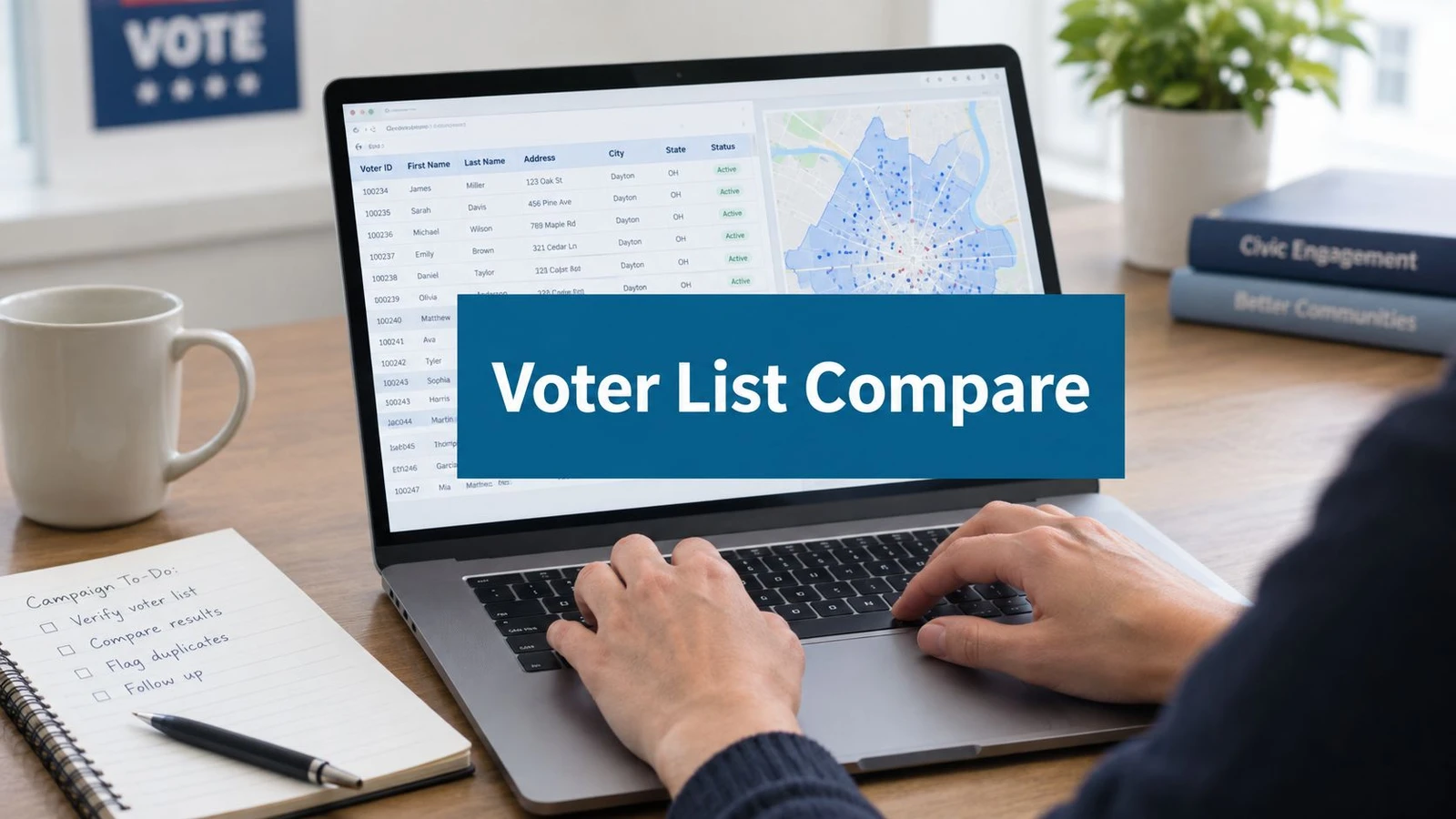
The night before a rally, a campaign manager may be reconciling three spreadsheets, searching sticky notes for a promised follow-up, and answering texts from field organizers who each have a different version of the same voter’s story. A volunteer knocked on the door, a donor registered for the event, and a constituent submitted a service request, but none of those interactions are connected.
A constituent relationship management system, or constituent CRM, brings those contacts into a shared operating record. For political campaigns, nonprofits, advocacy groups, and public offices, the important question isn’t whether the software resembles a sales database. It’s whether it can connect voter data, canvassing activity, volunteer work, donor engagement, communications, events, and casework without losing the context that makes each relationship useful.
The right evaluation starts in the field. Can the system receive canvassing-app results, match them to voter records, preserve the organizer’s notes, and trigger the next action? Can staff see whether a constituent has already been contacted, attended an event, opened an email, or requested help? Those questions matter more than a polished sales pipeline.
Table of Contents
- What a Constituent Relationship Management System Actually Does
- From City Service Hotlines to Modern Political CRMs
- Core Features Every Constituent CRM Must Handle
- Choosing the Right Category of Constituent CRM
- Implementation Best Practices for Campaigns and Civic Programs
- Why Most Constituent CRM Rollouts Actually Fail
- Example Workflows for Voter Contact and Civic Casework
- Evaluation Checklist and Next Steps for Adoption
What a Constituent Relationship Management System Actually Does
A constituent CRM is the campaign’s shared memory. It stores a person’s contact details, then adds the history needed to understand the relationship: doors knocked, calls placed, emails sent, events attended, donations made, volunteer shifts completed, and service requests opened or resolved.
That distinction matters because a contact record by itself is only an address book entry. A useful record answers practical questions. Who spoke with this person? What did they say? Which issue matters to them? What follow-up did someone promise? Is another team already working with them?
The record behind the relationship
Think of the system as a canvassing packet that never gets lost. A paper walk sheet might show a name and address. A constituent CRM can attach the walk result, issue response, staff note, event attendance, communication preference, and next task to the same profile.
The workflow usually has three layers:
- Contact data: Names, addresses, phone numbers, email addresses, household details, voter-file identifiers, and source information.
- Interaction history: Door conversations, calls, text replies, email activity, donations, volunteer participation, event check-ins, and casework notes.
- Action tools: Segments, assignments, reminders, automated messages, dashboards, and reports that turn history into coordinated work.
The point isn’t to record every action for its own sake. It’s to prevent the field team, communications staff, and policy team from treating one constituent as three unrelated contacts.
Practical rule: If a volunteer has to explain the entire relationship from memory before another staffer can act, the CRM record isn’t doing enough work.
Why political teams need a different lens
A sales CRM often organizes prospects around a deal, a sales stage, and a close. Constituent work is broader and usually longer-term. A voter may support a candidate, request help with a local issue, volunteer at an event, and later become a donor. Those activities shouldn’t be forced into a sales funnel.
Campaign teams should evaluate a CRM alongside their constituent intelligence and field workflows, including tools that turn conversations into usable follow-up. The system should preserve the relationship rather than reducing it to a single score or status.
From City Service Hotlines to Modern Political CRMs
The history of constituent management starts with public service, not campaign fundraising. Cities needed a reliable way to receive complaints, assign service requests, track progress, and report on recurring problems. That basic model established a durable principle: a resident’s request should move through a visible process instead of disappearing into an inbox.
Durham, North Carolina, created Durham One Call in 2004 as a centralized service model. By fiscal year 2008 to 2009, the system had a budget of $661,271, including $125,000 for CRM software and $450,000 in initial labor costs, as documented in the International City and County Management Association case study. In fiscal year 2008, the center answered 214,286 calls and processed 24,394 service requests, showing how a CRM could become an operational hub rather than a simple complaint log.
The move from phone queues to digital intake
Pasadena illustrates the next phase. Its citizen service center reported 1,581 registered users by March 2013, an increase of 25% from the prior quarter, and handled 1,175 service requests in the first quarter of 2013, a 165% increase over the same period in 2012. Sixty-four percent of those cases came through mobile apps, according to Communications of the ACM’s account of CRM adoption in cities.
That shift changed the record being managed. A constituent was no longer only a caller. They could submit a request through a phone, website, or mobile application, and the office needed to preserve the channel, status, owner, and outcome.
Advocacy organizations and nonprofits adapted the same logic for supporters, members, donors, and volunteers. Political technology then added campaign-specific needs, including voter-file matching, walk-list creation, persuasion responses, and field assignments.
Today, the strongest campaign architecture treats the canvassing app, voter-data source, communications tools, and constituent CRM as one connected ecosystem. The historical lesson is simple: a CRM becomes valuable when it helps people coordinate the next action, not when it merely stores the last interaction.
Core Features Every Constituent CRM Must Handle
A campaign CRM should be judged by what organizers can do with the data on a busy field day. Database terms matter, but the operational test is easier: can the team identify the right person, understand the latest interaction, assign the next step, and measure what happened?
Unified contact records
The contact record should combine voter-file entries, event sign-ins, web forms, donation activity, volunteer registrations, and casework submissions. It should also preserve source attribution, so staff can tell whether an address came from a voter-data provider, a form, a canvassing import, or a manual update.
Deduplication is essential. If a person appears under a voter-file record, an event registration, and a volunteer spreadsheet, the CRM should offer matching rules and review tools instead of creating three separate relationship histories.
Interaction history
Every meaningful touch should become part of a timeline. That includes a door knock, phone conversation, SMS reply, email engagement, event attendance, donation, staff note, and constituent service request.
The record should capture the date, channel, staff member or volunteer, outcome, and follow-up task. A note that says “interested” is less useful than a structured response showing the issue discussed, the person’s position, and the agreed next action.
Segmentation and workflows
Segmentation lets a field director build a list by geography, issue stance, donor status, volunteer status, or recent engagement. A rule builder should make those audiences reusable, not require a data analyst to export a new spreadsheet for every shift.
Workflows turn segments into action. A post-door text can follow a completed canvass, a lapsed donor can enter a reactivation sequence, and a casework request can route to the appropriate staff member. The automation should still respect consent and communication preferences.
Reporting and privacy
Reports should connect field activity to decisions. Useful views might show contact rates, responses by geography, volunteer activity, unresolved requests, or sentiment trends. The exact metrics depend on the program, but each report should answer a management question.
Privacy controls belong in the foundation, not as an afterthought. Look for role-based permissions, consent tracking, audit history, retention rules, and redaction options. A volunteer may need access to assigned doors, while a caseworker may need access to sensitive service notes. Integration planning should be explicit, especially when a campaign connects several systems through field and data integrations.
Choosing the Right Category of Constituent CRM
There isn’t one universal CRM category. A small local campaign with a few staff members and a limited volunteer operation may need a focused system that launches quickly. A statewide advocacy program may need a configurable platform with stronger casework, fundraising, and reporting capabilities.
Three categories appear frequently in political and civic technology decisions:
| Category | Best For | Strengths | Watch For |
|---|---|---|---|
| Standalone political CRM | Campaigns with established voter-file and organizing workflows | Political segmentation, supporter outreach, campaign reporting | Confirm canvassing-app compatibility and data ownership |
| Civic and nonprofit platform | Public offices, associations, and nonprofits with broad constituent programs | Casework, fundraising, memberships, advocacy, and configurable records | Implementation complexity, training needs, and integration cost |
| Field-operations suite | Campaigns centered on canvassing, route management, and rapid voter contact | Mobile data capture, assignments, routing, live progress, and field reporting | Check how well it connects to broader communications and constituent history |
Match the category to the operating model
Start with four questions. How large is the campaign? How many volunteers use the system? Which voter-data sources feed the operation? Which teams need access beyond field staff?
A lightweight political CRM may be enough when the campaign has a clear voter file, a narrow set of outreach channels, and a small administrative team. A civic or nonprofit platform becomes more relevant when the same record must support casework, memberships, donations, events, and long-term program reporting.
Field-operations software matters when canvassing is the center of gravity. The system should support offline collection, route assignments, survey responses, and rapid synchronization. A product such as doornoc belongs in this category, while voter-data services such as MailVotes can supply targeted records for field programs.
Don’t use a generic sales CRM as a substitute without testing the political workflow. It may lack constituent segmentation, opt-in tracking, household relationships, voter-data matching, and canvassing interoperability. Review the political campaign management software landscape against the work your team performs.
Implementation Best Practices for Campaigns and Civic Programs
Implementation starts before anyone configures a field. The team needs to understand what it already has, what should be retained, and which system will serve as the authoritative record.
1. Audit the existing data
Collect spreadsheets, email lists, event exports, volunteer forms, voter files, casework logs, and staff-maintained notes. Don’t import everything automatically. Mark each source by owner, purpose, update frequency, fields available, and known limitations.
The audit should also identify repeated fields with different meanings. One spreadsheet may use “support” for a canvasser’s response, while another uses it for a fundraising segment. Those definitions need to be resolved before they become CRM fields.
2. Deduplicate and validate
Match records across sources using appropriate identifiers and review uncertain matches manually. Address standardization, household handling, phone validation, and source labels help prevent a clean-looking database from hiding conflicting records.
Voter-file deduplication may require comparison against a provider such as MailVotes. The objective is not to erase history. It’s to retain the useful interaction record while deciding which contact identity, address, and consent status should govern future outreach.
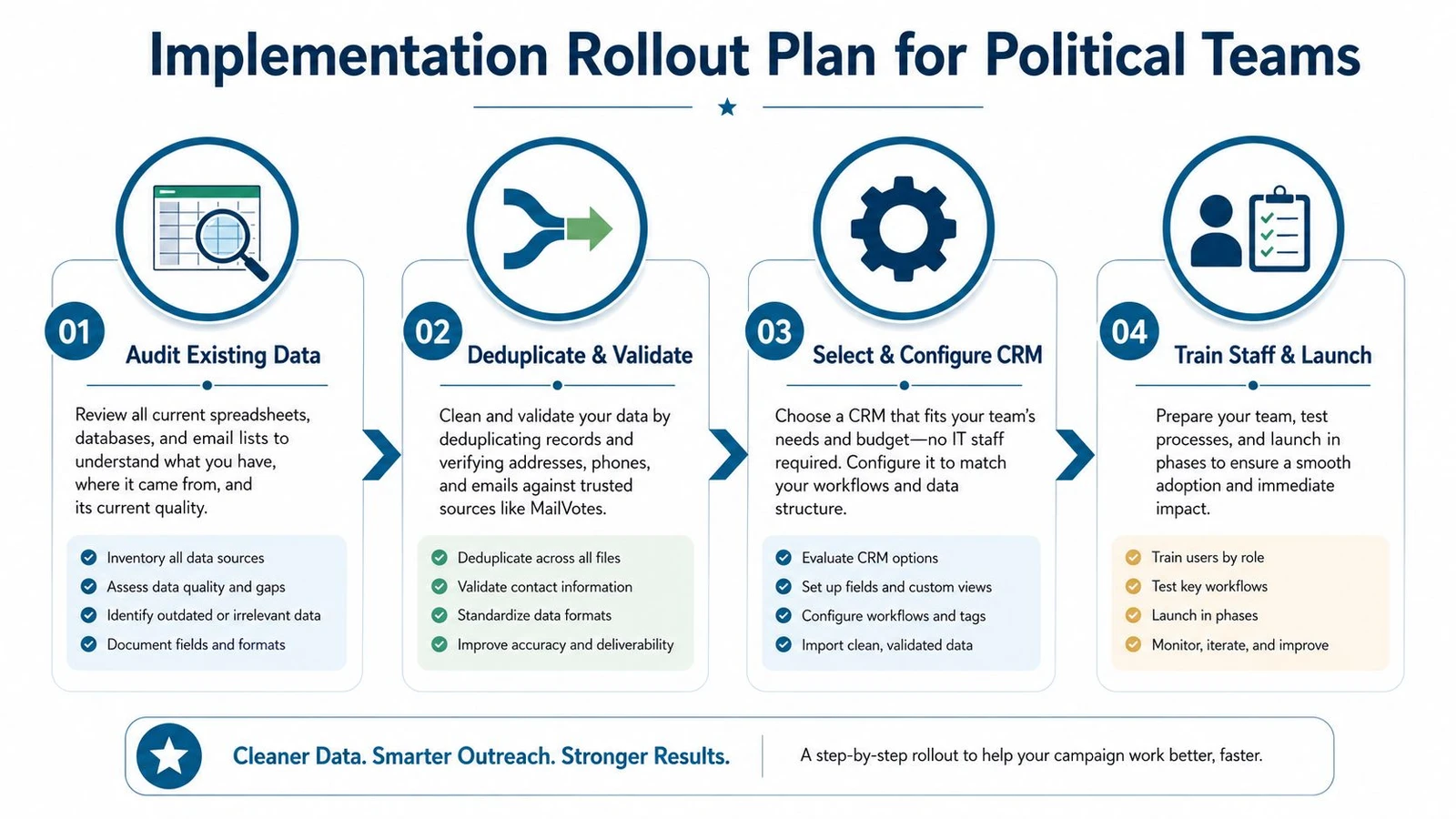
3. Configure the source of truth
Define the minimum viable record before adding optional fields. A campaign may need contact identity, geography, source, contact permission, interaction type, outcome, issue response, owner, and next action. A legislative office may add case category, status, priority, resolution, and correspondence history.
Map canvassing-app activity into the interaction timeline. Decide how event RSVPs, attendance, web forms, donations, and casework updates enter the same record. Each integration should specify its source, destination, matching rule, error handling, and update frequency.
4. Roll out in waves
Train administrators first, then candidate and senior staff, then field organizers and volunteers. Give each group tasks that match its role. An administrator should practice deduplication and permissions. A field lead should create turf, review submissions, and assign follow-ups. A volunteer should capture a conversation consistently and know what not to record.
Test the full path before a major canvassing day. Create a test contact, assign a route, submit a result offline, reconnect, confirm synchronization, trigger the follow-up, and check the report. Review data hygiene weekly during the rollout, including duplicate alerts, missing outcomes, unassigned tasks, and failed syncs.
Why Most Constituent CRM Rollouts Actually Fail
Software selection is rarely the hardest part. The recurring failure is operational: nobody decides who owns data quality, which fields are required, how staff should document interactions, or what happens when two systems disagree.
A city council initiative described a lack of consistent protocol for receiving, documenting, assigning, tracking, coordinating, and reporting constituent inquiries. Its recommendation for a centralized CRM and case-management system addressed a process gap, not merely a technology gap, as shown in the Spokane City Council final report.
The symptoms are familiar
Teams often return to shared spreadsheets because the CRM asks for too many fields, loads poorly in the field, or doesn’t reflect the workflow people already use. Duplicate records appear when canvassing imports, event lists, and voter data enter without matching rules. Privacy problems emerge when volunteers can see information they don’t need or when staff keep sensitive notes in untracked documents.
Campaigns are especially vulnerable because cycles are short and staff turnover is high. A system that depends on one data manager’s memory will deteriorate when that person leaves. New volunteers then copy old habits, and the CRM becomes a reporting shell rather than a working record.
Governance has to be assigned
Name an owner for field definitions, a reviewer for duplicate records, and an administrator for access controls. Document the required steps for entering a contact, closing a task, changing consent, correcting an address, and resolving a duplicate.
The CRM isn’t the campaign’s filing cabinet. It’s the agreement about how the campaign works.
Training should use real political tasks, not a generic product tour. Have staff complete a door follow-up, update a case status, register an event attendee, and produce a report. When the system reflects those handoffs, adoption becomes part of the daily operation instead of an optional administrative chore.
Example Workflows for Voter Contact and Civic Casework
A constituent CRM becomes useful when a contact moves cleanly from one team to another. The following workflows show the trigger, the information captured, the next action, and the management view produced.
Door-knocking program
Trigger: A canvasser completes a door interaction in a mobile app.
Data captured: The system records the address, matched person or household, contact outcome, survey responses, notes, canvasser, route, and time of interaction. If the device is offline, the app should preserve the submission and synchronize it when connectivity returns.
Automation: A supporter can receive a volunteer invitation, an undecided voter can enter a persuasion follow-up, and a resident who requests information can receive a task for the appropriate staff member. The CRM should avoid sending a message when the contact has opted out or another staffer already owns the follow-up.
Report: The field director sees completed doors, response patterns, unresolved follow-ups, and results by geography or team. Communications staff can use the resulting segment without rebuilding the walk list from scratch.
Civic casework pipeline
Trigger: A constituent submits an issue through a web form, email, phone note, or in-district conversation.
Data captured: The record includes the constituent, issue category, source channel, description, consent, assigned staff member, priority, status, correspondence, and resolution note.
Automation: The CRM creates a case, routes it to an owner, sets a task, and records each handoff. A closed case can trigger a feedback request or a reminder to confirm that the constituent received an answer.
Report: Managers can see open cases by category, owner, age, district area, and status. They can also identify recurring requests that deserve policy attention.
Event RSVP and attendance
Trigger: A supporter registers online or signs in at the event.
Data captured: The system stores RSVP status, attendance, event role, ticket or donation information where relevant, volunteer interest, and communication preferences.
Automation: No-shows can receive a follow-up message, attendees can receive a thank-you, and interested volunteers can enter an organizing sequence. The record should distinguish registration from actual attendance.
Report: The campaign can compare turnout, volunteer recruitment, follow-up completion, and engagement by event type.
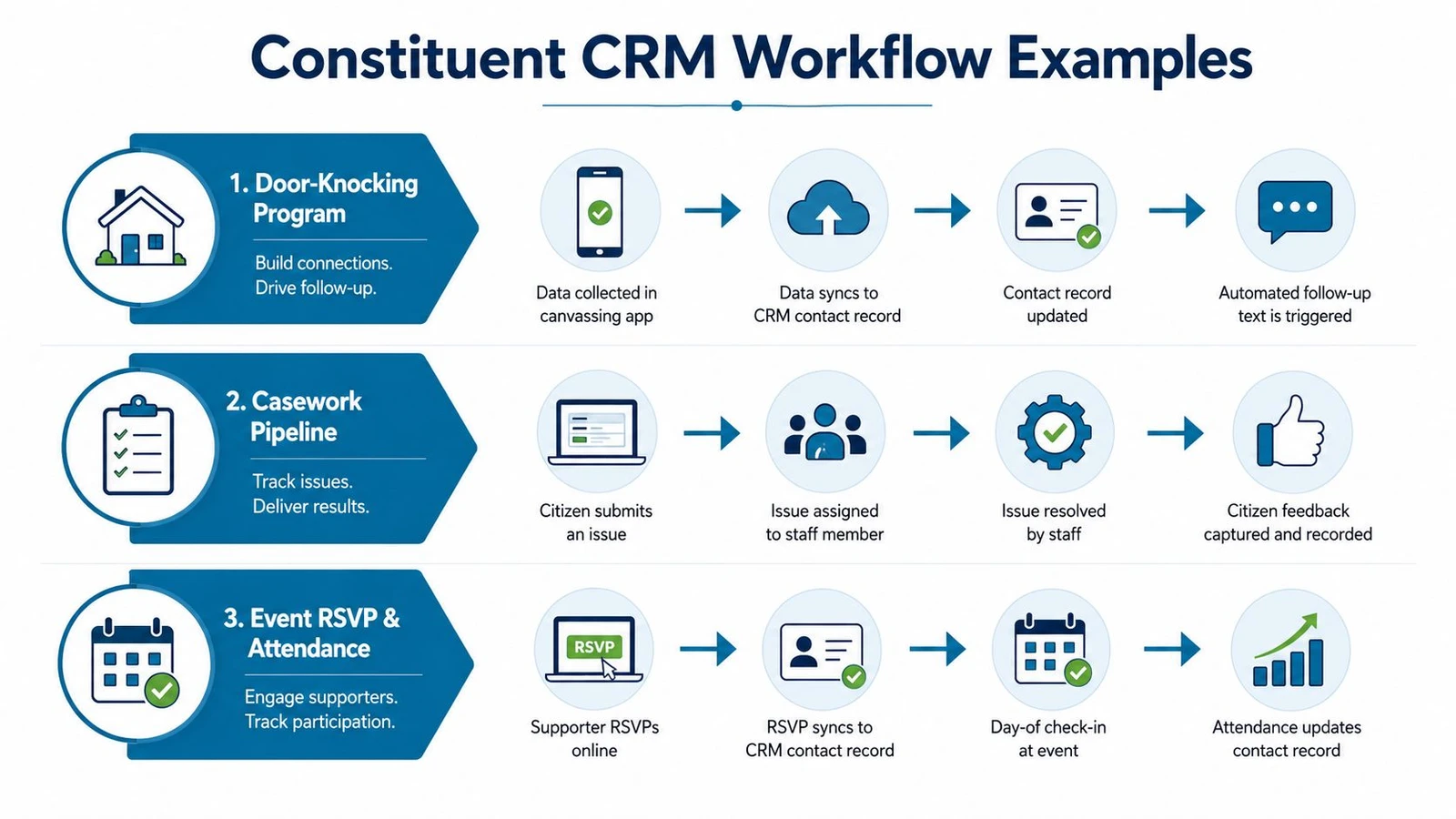
The workflow diagram makes the handoffs visible. That visibility is the difference between a CRM as a passive database and a CRM as the connective tissue between field, digital, communications, fundraising, and constituent services.
Evaluation Checklist and Next Steps for Adoption
Treat vendor selection as a scored decision, not a tour of attractive features. Ask each provider to demonstrate your actual workflow, including a voter-data import, a canvassing result, a duplicate review, a follow-up task, a permission boundary, and a management report.
| Criterion | What to Look For | Score (1-5) |
|---|---|---|
| Contact record depth | Unified profiles with source, household, consent, and interaction history | |
| Canvassing integration | Mobile capture, offline support, synchronization, and outcome mapping | |
| Voter-data synchronization | Matching, geocoding, source labels, and update controls | |
| Workflow builder | Flexible assignments, reminders, follow-ups, and case routing | |
| Reporting | Field, engagement, casework, event, and data-quality views | |
| Privacy controls | Role-based access, consent tracking, audit history, and redaction | |
| Pricing model | Clear licensing, migration, support, training, and integration costs | |
| Support quality | Useful documentation, onboarding, response process, and escalation path |
Score each criterion against the campaign’s real priorities. A system with fewer features may still win if volunteers can use it consistently and field data reaches the right staff without manual re-entry.
Adoption should follow a deliberate sequence:
- Align campaign, field, digital, fundraising, and policy stakeholders.
- Choose one pilot workflow, such as a canvass-to-follow-up sequence.
- Import a controlled data set and review matches.
- Train administrators, staff, and volunteers by role.
- Launch with documented ownership and escalation rules.
- Review adoption, data quality, integrations, and reporting at 30, 60, and 90 days.
The best constituent relationship management system is the one that preserves the full story of a relationship and helps the next person act on it. Start by mapping your doors, calls, forms, events, donations, and casework, then test whether each vendor can connect those steps without sending your team back to spreadsheets.
doornoc combines a mobile canvassing application, route planning, offline interaction logging, voter-data services, dashboards, and integration tools for campaign field operations. Visit doornoc to evaluate how a connected field workflow could support your constituent CRM adoption plan.
Running constituent services for an office? doornoc’s constituent intelligence keeps casework, contact history and voter-file data in one record instead of three systems.